
Before you even think about tackling the 12 core requirements of PCI DSS, you need to take a step back. A successful compliance effort isn't about blindly following a generic checklist; it's about understanding your own business first. This means getting a firm handle on your scope, figuring out your merchant level, and accepting that this is an ongoing process, not a one-and-done project.
Your PCI DSS Compliance Journey Starts Here
Many people see Payment Card Industry Data Security Standard (PCI DSS) compliance as this massive, intimidating technical hurdle. But honestly, the groundwork is more about strategy than anything else. Before you touch a single firewall rule or encryption key, you have to know exactly what you're trying to protect.
This initial planning phase is what separates a truly secure environment from one that just checks boxes for an auditor. It all starts with defining your scope.
Think of it this way: your scope includes every single person, process, and piece of technology that touches—or could even affect the security of—cardholder data. This is your Cardholder Data Environment (CDE). Getting this wrong is one of the most common mistakes I see. If your scope is too narrow, you'll leave gaping holes in your security. If it's too broad, you'll waste a ton of time and money securing things that don't need it.
What's Your Merchant Level?
Once you have a clear picture of your CDE, the next piece of the puzzle is determining your merchant compliance level. PCI DSS isn't a one-size-fits-all deal. The validation requirements you'll need to meet are based on how many card transactions you process each year.
This infographic lays out the foundational steps perfectly: first, you define your scope, then you identify your merchant level, and only then do you grab the right checklist for your business.
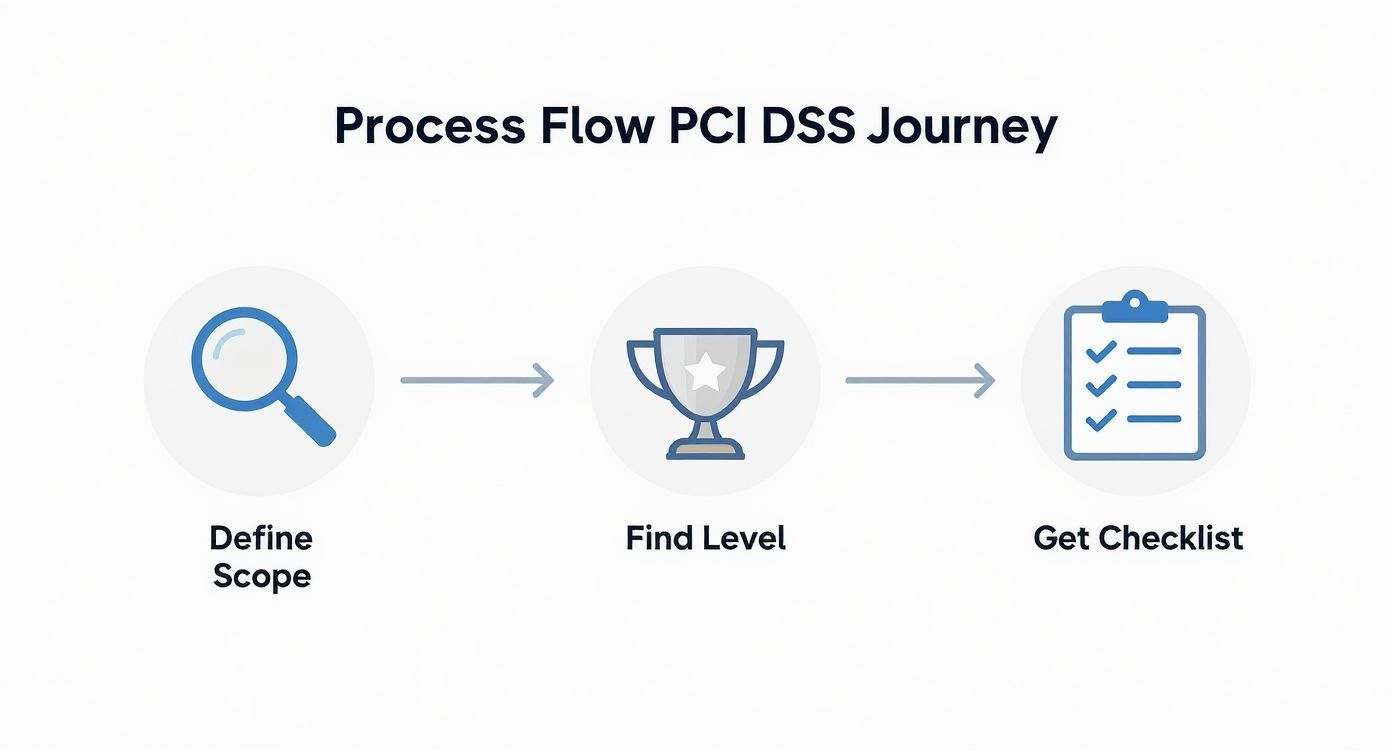
It really drives home the point that good compliance begins with smart planning, long before you start checking off individual requirements.
These levels are recognized worldwide, from Level 4 merchants (processing fewer than 20,000 transactions a year) all the way up to Level 1 giants (handling over 6 million). Considering that card payments account for over 60% of all consumer transactions in North America, knowing where you fall is absolutely essential.
To help clarify this, here’s a quick breakdown of the different merchant levels and what they typically require for validation.
| Compliance Level | Annual Transaction Volume | Validation Requirements |
|---|---|---|
| Level 1 | Over 6 million transactions | Annual Report on Compliance (ROC) by a Qualified Security Assessor (QSA). |
| Level 2 | 1 to 6 million transactions | Annual Self-Assessment Questionnaire (SAQ) and quarterly network scans. |
| Level 3 | 20,000 to 1 million e-commerce transactions | Annual Self-Assessment Questionnaire (SAQ) and quarterly network scans. |
| Level 4 | Fewer than 20,000 e-commerce transactions | Annual Self-Assessment Questionnaire (SAQ) recommended. |
Understanding these tiers helps you budget for and prepare for the right kind of assessment, saving you from any last-minute surprises.
It's a Marathon, Not a Sprint
Lastly, and this is crucial, you have to treat PCI DSS as an ongoing commitment, not a project with a finish line. Cyber threats are constantly evolving, your systems will change, and new vulnerabilities pop up all the time.
Shifting your mindset from a once-a-year audit scramble to a continuous security culture is a game-changer. This proactive stance is at the heart of the importance of cybersecurity for growing businesses and is fundamental to protecting your company in the long run.
Here's something many businesses miss: a solid PCI DSS program is actually a business enabler. It's not just a cost center. It builds deep trust with your customers, drastically reduces the risk of a devastating data breach, and frankly, just creates a more secure and resilient business overall.
Building and Maintaining a Secure Network Foundation
This is where your PCI DSS compliance journey truly begins—with the bedrock of your entire payment environment. Requirements 1 and 2 are all about establishing a strong digital perimeter and then hardening every system inside it. Think of this as your first, and arguably most important, line of defense against intruders.
A well-configured firewall acts as the vigilant gatekeeper for your network. Its entire job is to scrutinize all traffic coming in and going out, blocking anything that doesn’t follow the strict security rules you've set. This is what stops attackers from getting anywhere near your Cardholder Data Environment (CDE).
But just having a firewall isn't enough. I've seen too many businesses install one and then forget about it, leaving default, out-of-the-box rules that are full of holes. Active management and clear documentation are non-negotiable.
Fine-Tuning Your Firewall and Network Security
To properly shield cardholder data, your firewall rules can't be generic. They need to be incredibly specific, only allowing traffic that is absolutely essential for business to pass into or out of the CDE.
One of the smartest strategies here is network segmentation. This is like building digital walls inside your network, creating isolated, secure zones. Your CDE, the area handling all the sensitive payment card info, must be completely sealed off from other parts of your business, like your guest Wi-Fi or general corporate network.
Here’s what you need to do to get this right:
- Document every single firewall rule. Keep a log that details what each rule does, the business reason for it, and which services it allows. Auditors will ask for this.
- Review your rules every six months. As your business evolves, old rules can become obsolete and introduce risks. Regular check-ins keep your defenses tight.
- Block everything by default. Your firewall's core posture should be to deny all traffic from untrusted networks, only permitting connections you have explicitly authorized.
This level of network oversight can get complicated fast. It's why many companies look into the benefits of managed IT and cybersecurity services—it ensures an expert is always keeping configurations optimized and compliant.
A firewall without proper segmentation is like having a bank vault door on a house with all the windows wide open. If one part of your network gets hit, segmentation stops the threat from spreading to your most valuable data.
Hardening Systems Beyond Vendor Defaults
The second half of a strong foundation is about removing the low-hanging fruit for attackers. When you get a new router, server, or piece of software, it almost always arrives with generic, vendor-supplied passwords and settings. We've all seen them: "admin/password." Hackers maintain massive lists of these defaults and run automated scripts 24/7 to find systems that someone forgot to change.
Leaving these defaults in place is one of the quickest ways to fail a PCI audit and suffer a breach. The standard is crystal clear: you must change all vendor-supplied defaults and remove or disable unnecessary default accounts before that system ever touches the network.
Here's how to tackle this systematically:
- First, build and maintain a complete inventory of every system component in your CDE. You can't secure what you don't know you have.
- Next, create documented configuration standards. These guides should cover everything from changing default credentials and disabling unused services to applying secure protocols.
- Finally, dedicate each server to a single primary function. This prevents services with different security needs (like a web server and a database) from sitting on the same machine, which can create a security conflict.
By establishing these solid standards, you shift from a reactive security stance to a proactive one. Instead of just patching problems, you're building systems that are secure from the moment they're switched on. That systematic, security-by-design approach is what PCI DSS is all about.
Protecting Data and Managing System Vulnerabilities
Alright, with your network perimeter secured, it's time to shift our focus inward. The next part of your PCI DSS journey, covering Requirements 3 through 6, is all about protecting the actual cardholder data and actively managing the vulnerabilities in the systems that handle it.
The philosophy here is straightforward: if you don’t absolutely need the data, don’t keep it. And if you must keep it, you have to make it completely unreadable to anyone who isn’t supposed to see it.
Safeguarding Stored Cardholder Data
Requirement 3 gets right to the heart of the matter—protecting stored cardholder data. The PCI standard is crystal clear: the full Primary Account Number (PAN) must be unreadable wherever you store it. This isn't a suggestion; it's a non-negotiable rule.
You've got a few solid methods to make this happen, and each has its place.
- Encryption: This classic approach uses a cryptographic key to scramble the PAN. Without the right key, the data is just gibberish.
- Tokenization: Here, you swap the real PAN for a unique, non-sensitive "token." The actual card number gets locked away in a secure, offsite vault, far from your environment.
- Truncation: This involves permanently chopping off part of the PAN. Think of a receipt showing only the last four digits (e.g.,
************1234). It's still useful for customer service, but useless to a thief.
You absolutely need a data retention policy that spells out exactly what data you store, where it lives, and for how long. Once data is no longer needed for business or legal reasons, you must have a process to destroy it securely. Solid credit card fraud prevention strategies are built on this foundation of responsible data handling.
Encrypting Data in Transit
Protecting data at rest is only half the battle. Requirement 4 demands that you encrypt cardholder data whenever it travels over open, public networks—like the internet. This stops criminals from digitally "eavesdropping" and snatching sensitive info as it zips between your customer and your systems.
Think of it as the difference between sending cash in a sealed armored truck versus a see-through envelope. You need that armored truck.
A critical point for your checklist: You must forbid the use of old, broken security protocols. Any use of outdated standards like SSL or early TLS (v1.0) is an automatic fail. Your systems need to be locked down to use strong, modern protocols like TLS 1.2 or higher for any and all data transmissions.
Maintaining a Vulnerability Management Program
Now let's talk about system health. Requirements 5 and 6 are all about building a proactive defense by finding and fixing security weaknesses before attackers can exploit them.
It starts with Requirement 5, which mandates using and regularly updating anti-virus software. This isn't just for your servers; it applies to every system that could be a gateway to your card data environment, including employee workstations.
Your action items here are clear:
- Deploy anti-malware software across all in-scope systems.
- Make sure it's always running and automatically updating with the latest threat definitions.
- Set up and confirm that periodic scans are happening.
- Keep the audit logs to prove it's all working.
This isn't a "set it and forget it" task. You have to actively manage this and be ready to show an auditor that your defenses are up and running.
Developing and Maintaining Secure Applications
Finally, Requirement 6 zeroes in on the security of the software you run, whether it’s a custom-built e-commerce platform or an off-the-shelf payment application. If you have public-facing web apps, you must protect them from common attacks, either through regular vulnerability scanning or by placing a Web Application Firewall (WAF) in front of them.
This requirement also forces you to have a formal process for tracking and fixing security vulnerabilities. That means staying on top of security alerts from your software vendors and having a clear system for ranking risks.
Here’s a practical game plan for handling this:
- Identify New Vulnerabilities: Keep a close eye on sources like the National Vulnerability Database (NVD) for any new threats that apply to your tech stack.
- Assign a Risk Ranking: Not all bugs are created equal. Use a standard like the Common Vulnerability Scoring System (CVSS) to classify threats as critical, high, medium, or low.
- Prioritize Patching: Based on that risk score, you patch. PCI DSS is strict here, often giving you just 30 days to fix critical vulnerabilities. You have to move fast.
By building these habits—protecting data, encrypting it in transit, and systematically hunting down vulnerabilities—you create a resilient security posture. You’re no longer just playing defense; you’re building a program that can adapt to new threats, forming the strong core of your entire PCI DSS compliance effort.
Implementing Strong Access Control Measures

Knowing exactly who is touching your sensitive data is the heart of any real security strategy. This is where your PCI DSS checklist gets into Requirements 7, 8, and 9—the triad that governs human access to your Cardholder Data Environment (CDE). It’s all about making sure the right people have the right access, and only when they absolutely need it.
The whole idea boils down to a classic security concept: the principle of least privilege. It's a simple but incredibly effective rule of thumb. Every user gets the absolute bare minimum access needed to do their job. Nothing more.
A marketer, for instance, has zero business reason to be poking around in a database of raw credit card numbers. By the same token, a junior developer shouldn't have god-mode admin rights to your live servers. Adopting this mindset dramatically shrinks your attack surface.
Restricting Access Based on Need-to-Know
Requirement 7 is where you turn the principle of least privilege from a concept into a reality. Your access control policies should always start with a "deny-all" setting. This means no one gets access to anything by default. Access is only granted when a clear business need is documented, justified, and approved.
Here's how to put that into practice:
- Define Job Roles: Map out every position in your company, clearly documenting what they do and what specific data they need to do it.
- Assign Privileges by Role: Grant access based on these defined roles, not just because someone asks for it.
- Review Everything, Regularly: At least every six months, you need to conduct a thorough review of who has access to what. People move into new roles or leave the company, and their old permissions need to be yanked immediately.
Think of it like a hotel keycard system. The general manager might have a master key, but the cleaning crew only gets keys for the specific floors they're assigned to that day. It's a practical, risk-based approach that contains potential damage.
Assigning Unique IDs and Nailing Down Authentication
Once you’ve figured out who can access what, Requirement 8 deals with how they get in. The rule is ironclad: every single person with computer access needs a unique User ID. Shared or generic accounts like "admin," "webmaster," or "support" are a huge red flag and strictly forbidden.
This isn't just bureaucratic red tape. You have to be able to trace every single action back to a specific individual. Without unique IDs, accountability evaporates. When something goes wrong—and it will—you’ll have no idea who was responsible, making any investigation a nightmare.
Beyond unique IDs, you have to get serious about authentication. This starts with strong password policies:
- Minimum Length: At least 12 characters.
- Complexity: A mix of letters and numbers is mandatory.
- History: Users shouldn't be able to recycle their last four passwords.
- Lockouts: After six failed login attempts, lock the account for at least 30 minutes.
The Mandatory Shift to Multi-Factor Authentication
A critical change in PCI DSS 4.0, which becomes mandatory after March 31, 2025, is the push for much stronger authentication. This new version introduces 64 new requirements, and a big one is the mandate for Multi-Factor Authentication (MFA) for all access into the CDE. This is no longer just for admins.
This makes enhancing security with two-factor authentication a non-negotiable part of your security stack. MFA adds a crucial second line of defense by requiring users to prove their identity with more than just a password. They’ll need to provide at least two verification factors, like something they know (a password), something they have (a phone app or token), or something they are (a fingerprint).
Controlling Physical Access to Cardholder Data
Finally, remember that access control isn't just a digital problem. Requirement 9 applies these same principles to the physical world. You have to protect the actual servers, routers, and paper records that store or transmit cardholder data.
This involves a few common-sense, practical steps:
- Secure Sensitive Areas: Use facility controls like keycard readers or biometric scanners to lock down server rooms and data centers.
- Monitor Physical Access: Install video cameras and maintain entry logs for these sensitive areas so you always know who’s coming and going.
- Manage Media: Have strict, documented procedures for handling physical media like backup tapes or hard drives. Track their every move.
- Destroy Media Securely: When you no longer need old media, it must be destroyed so the data is completely unrecoverable. This means cross-cut shredding for paper, degaussing tapes, or physically destroying old hard drives.
By layering strong digital controls with tough physical security, you build a layered defense that satisfies this vital section of your PCI DSS compliance checklist.
Monitoring Networks and Maintaining Security Policies

Getting your firewalls configured and access controls locked down feels like a huge win, but that’s just the start of the PCI DSS journey. Compliance isn’t a one-and-done project; it’s a constant state of readiness. This final stretch of the checklist deals with Requirements 10, 11, and 12—the ongoing, day-to-day work that keeps your defenses from getting stale.
These last three requirements are all about vigilance. It means you have to constantly watch what's happening on your network, proactively test your defenses for weak spots, and stick to a formal security policy that guides every single decision. If you let any of these slide, even the most robust initial setup will eventually crumble.
Tracking and Monitoring All Network Access
Requirement 10 sounds simple on paper, but it takes real discipline: you have to track and monitor all access to your network and cardholder data. In practice, this means building a detailed audit trail of every single event that takes place inside your Cardholder Data Environment (CDE).
I always tell clients to think of these audit logs as the security cameras for their network. They give you an undeniable record of who did what, and when they did it. If a breach ever happens, these logs are often the only tool investigators have to piece together the timeline and find the source of the attack.
To get this right, your systems need to log key events automatically. And it's not just about tracking successful logins. The standard is much more comprehensive.
- Individual User Actions: Every click and command by anyone with admin-level privileges needs to be logged.
- Access to Audit Trails: You absolutely must log any time someone views or, more importantly, tries to change the audit logs themselves.
- Invalid Login Attempts: A spike in failed login attempts is one of the oldest and most reliable red flags for an ongoing attack.
- Changes to Accounts: Any new accounts created, permissions modified, or accounts deleted must be recorded.
But here's the thing: just generating terabytes of log data is useless. The real work is in reviewing them daily. Automated tools are great for flagging obvious red flags, but a skilled human eye is still essential for spotting subtle anomalies that an algorithm might miss.
Regularly Testing Your Security Systems
Requirement 11 is where we shift from passive observation to actively poking and prodding your defenses. It’s not enough to think your security is solid; you have to prove it by trying to find the holes before the bad guys do. This means running a few different kinds of tests.
The first step is quarterly vulnerability scanning. You'll need to hire an Approved Scanning Vendor (ASV) to run scans against your external-facing systems. Think of it as a report card for your network's perimeter that points out any glaring weaknesses or missed patches.
The next level up is the annual penetration test. This is much more intense. You're basically hiring a team of ethical hackers to simulate a real-world attack. They'll actively try to exploit any vulnerabilities they find to see just how far they can get into your network. It's an invaluable reality check on your security posture.
A clean vulnerability scan is great, but a penetration test tells the real story. It goes beyond finding theoretical weaknesses and shows you what a determined attacker could actually accomplish. In my experience, it's one of the most important things you can do for your security program.
PCI DSS requires you to run both internal and external penetration tests. You also have to re-test after any significant change to your environment, just to make sure a new feature didn't accidentally open up a new security hole.
Maintaining a Formal Information Security Policy
Finally, Requirement 12 ties everything together. This is the big one that requires you to create and maintain a comprehensive information security policy that dictates your entire approach to security. This can't be some document that just gathers dust on a shelf—it has to be the living rulebook for your entire organization.
A well-written security policy sets crystal-clear expectations for employees, contractors, and anyone else with access. It needs to be thorough, covering everything from acceptable use to incident response, ensuring everyone knows their role in protecting data.
Key Policy Components
- Annual Risk Assessment: Your policy has to mandate a formal risk assessment at least once a year. This is how you stay on top of new and emerging threats.
- Security Awareness Training: You must have a formal training program for all employees when they're hired and refresh it at least annually.
- Incident Response Plan: When something goes wrong, what's the plan? Your policy must detail a step-by-step incident response plan that can be kicked into action at a moment's notice.
This formal documentation is the backbone of your entire PCI DSS program. It’s what you show auditors to prove your security efforts are intentional, well-organized, and applied consistently across the board.
Keeping up this level of vigilance—the constant monitoring, the rigorous testing, and the detailed policies—is a massive undertaking. It's no surprise that the PCI DSS compliance services market is expected to hit $7.01 billion by 2025 as more companies look for expert help. Partnering with a managed security provider can ensure these critical tasks are done right, letting you focus on what you do best. To see what that looks like, you can explore the different types of managed cybersecurity services out there.
Common Questions About PCI DSS Compliance
Even with a comprehensive checklist in hand, working through PCI DSS compliance always brings up some tough questions. It's completely normal. Let’s clear up a few of the most common hurdles people face.
I've seen many businesses get hung up on the differences between PCI versions or struggle with how modern technology, especially the cloud, fits into the picture. Getting these details right is the key to building a security strategy that works today and stands up to future challenges.
What Is the Difference Between PCI DSS 3.2.1 and 4.0?
The move from PCI DSS 3.2.1 to 4.0 is probably the biggest shake-up we've seen in years. It’s a direct response to new threats and a push for more flexible, effective security. While version 3.2.1 is officially retired, you have until March 31, 2025, before all the new 4.0 requirements are fully enforced.
So, what’s really changed? Here are the highlights:
- Customized Validation: This is a game-changer. It allows you to meet requirements using your own innovative security controls, as long as you can prove they deliver the same (or better) security outcome. It’s a move away from rigid, one-size-fits-all rules.
- Mandatory MFA: Multi-Factor Authentication isn't just for admins anymore. Under 4.0, it’s required for all access into the Cardholder Data Environment (CDE). No exceptions.
- A Focus on Continuous Security: The new standard really doubles down on ongoing security monitoring and targeted risk analyses. The goal is to shift everyone away from thinking of compliance as a once-a-year audit.
This evolution is all about encouraging a more proactive, risk-based approach to securing cardholder data.
How Does Cloud Computing Affect My PCI DSS Scope?
Migrating to a cloud service provider (CSP) like AWS or Azure can definitely take some of the weight off your shoulders, but it’s not a get-out-of-jail-free card. Your PCI DSS scope is still very much your responsibility, and it's heavily influenced by the service model you’re using—IaaS, PaaS, or SaaS.
Your CSP handles the security of their core infrastructure, but you’re on the hook for securing the data, applications, and operating systems you put on top of it. This is what we call the shared responsibility model.
You absolutely must get an Attestation of Compliance (AOC) from your cloud provider. Beyond that, you need to dig into their shared responsibility matrix to map out exactly where their controls end and yours begin. Gaps here are incredibly dangerous.
What Are the Penalties for PCI DSS Non-Compliance?
Here’s a common misconception: the PCI Security Standards Council doesn't actually fine anyone. The real financial pain comes from the major card brands (Visa, Mastercard, etc.) and the acquiring banks that process your payments.
And trust me, the consequences are steep. They can include:
- Hefty Monthly Fines: We’re talking anywhere from $5,000 to $100,000 per month until you get your act together.
- Higher Transaction Fees: Your bank can simply start charging you more for every transaction.
- Crippling Breach Liability: If a data breach happens while you're non-compliant, you could be on the line for forensic investigation costs, fraudulent charges, and astronomical legal fees.
But the biggest penalty isn't financial, at least not directly. It’s the catastrophic loss of customer trust and the hit to your reputation. That kind of damage can last for years, easily eclipsing what it would have cost to become compliant in the first place.
Navigating the complexities of your pci dss compliance checklist doesn't have to be a solo effort. At Defend IT Services, we provide the expert guidance and managed security solutions to ensure your business is protected, compliant, and ready for whatever comes next. Secure your operations and build customer trust by visiting us at https://defenditservices.com.