
Think of your business's IT as the central nervous system of your entire operation. It's the web of servers, computers, software, and cloud services that connects everything and everyone. Network and infrastructure management is the art and science of keeping that entire system healthy, secure, and running at peak performance. It's the foundation that supports every email sent, every transaction processed, and every customer served.
Decoding Your Digital Foundation
Let's use an analogy. Picture your business as a high-performance race car. The engine, the electronics, the fuel system—all of these complex parts have to work together perfectly to win the race. Network and infrastructure management is your expert pit crew. They aren't just there to fix a flat tire; they're constantly monitoring performance, tuning the engine, and anticipating problems before they happen.
Without this oversight, you’re just hoping for the best. This discipline moves IT from a reactive "break-fix" cycle to a proactive strategy designed to maintain and optimize the technology that your company depends on every single day.
The Scope of Management
So, what does this "pit crew" actually manage? It's a surprisingly broad and interconnected set of assets. A solid management strategy keeps a close eye on all of them, ensuring they work in perfect harmony.
Key areas of focus include:
- Physical Hardware: This is the tangible stuff—the servers in the rack, the routers directing traffic, the switches connecting your team, and every workstation on every desk.
- Software and Applications: It’s not enough for software to just be installed. It needs to be updated, patched against vulnerabilities, and running smoothly.
- Network Connectivity: This covers everything that keeps you connected, from the local area network (LAN) in your office to the wide area network (WAN) linking multiple locations.
- Cloud Resources: More and more, businesses rely on services from providers like AWS or Azure. Managing these virtual resources is just as critical as managing the hardware you can physically touch.
Understanding the different cloud infrastructure management services available is crucial, as they've become a central piece of the modern IT puzzle, offering flexibility you just can't get with on-premise hardware alone.
A well-managed infrastructure is the ultimate business enabler. It transforms IT from a cost center into a strategic asset that drives efficiency, security, and growth, allowing teams to focus on innovation instead of firefighting.
From Reactive Fixes to Proactive Strategy
The old way of thinking about IT was simple: wait for something to break, then call someone to fix it. This is a recipe for disaster in today's world. Modern network and infrastructure management is built on a proactive philosophy. The goal is to spot trouble long before it causes an outage.
For instance, intelligent monitoring can detect that a server's hard drive is showing early signs of failure. An alert goes out, and the drive is replaced during a scheduled maintenance window. The alternative? The drive crashes unexpectedly at 3:00 PM on a Friday, taking a critical application offline with it.
This proactive approach is what separates a resilient, stable business from one constantly lurching from one crisis to the next. By investing in a structured management plan, companies build a digital foundation they can truly rely on. Many businesses find that partnering with a dedicated provider for managed IT services gives them access to specialized expertise and advanced tools, ensuring their digital engine is always finely tuned for success.
The Core Components of Modern IT Infrastructure
To get a real handle on managing your company's digital world, you first need to understand what it's made of. Think of network and infrastructure management like being the superintendent of a complex building. You have to know the electrical grid, the plumbing system, and the structural supports to keep everything running smoothly and safely. In IT, those "supports" are your servers, cloud services, and virtualization—the engines that power your entire operation.
Each of these pieces has its own job, but they're all deeply connected. A problem in one area can quickly ripple out and cause disruptions across the business. Getting a clear picture of how these building blocks work together is the first step toward building an IT setup that’s resilient, efficient, and ready to support your company’s growth.
Physical Hardware and Data Centers
At the very foundation of it all, you have the physical hardware. These are the tangible, real-world assets that form the bedrock of your IT environment. For years, this meant racks of servers, routers, and switches humming away in a server room down the hall or in a dedicated data center.
These components provide the raw computing power, storage, and connectivity your business relies on.
- Servers: These are the workhorses. They’re the powerful computers that store your data and run the applications your team uses every single day, from accounting software to your customer relationship management (CRM) system.
- Networking Gear: This includes the routers, switches, and firewalls that act as the traffic cops for your data, connecting your employees to internal resources and the wider internet.
- Storage Arrays: These are essentially massive, centralized hard drives that ensure all your critical business information is saved, protected, and accessible when you need it.
Even with the massive shift to the cloud, physical hardware hasn't gone away. In fact, understanding these foundational elements is more important than ever, especially with the rise of data center infrastructure needed to handle our ever-growing appetite for data.
This diagram shows how all the different pieces of a typical IT ecosystem are layered on top of one another.
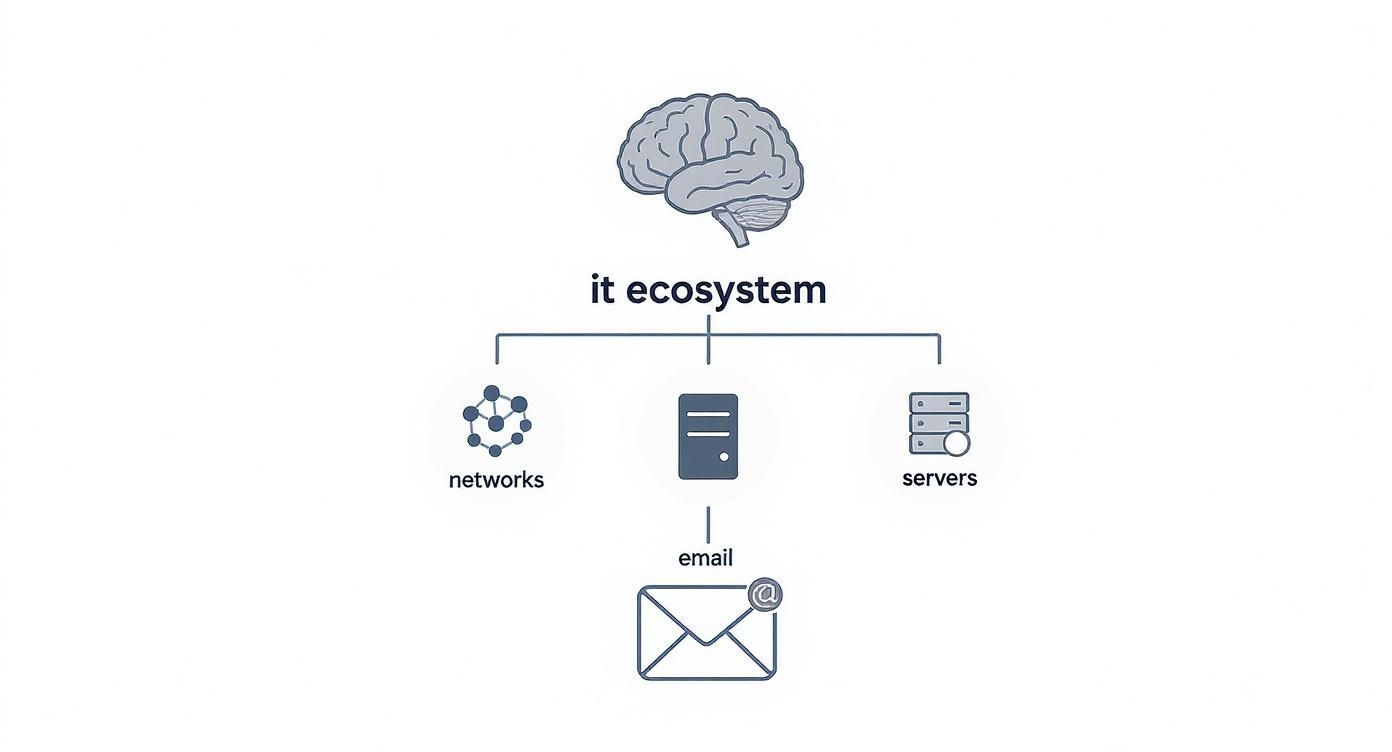
You can see how the foundational networks and servers support higher-level functions like email, all managed under the umbrella of the complete IT ecosystem.
Virtualization: The Efficiency Multiplier
It wasn't that long ago that the standard practice was to run one application on one physical server. This was incredibly inefficient. Most servers were only using a tiny fraction of their available power, which meant wasted electricity, wasted space, and wasted money. Then virtualization came along and changed the game completely by allowing a single physical server to act like multiple, separate "virtual" servers.
It’s like taking a huge, single-family mansion and converting it into a multi-unit apartment building. The physical structure is the same, but now you can house many tenants efficiently. This is all made possible by a lightweight software layer called a hypervisor, which carves up the server’s resources—CPU, memory, storage—and allocates them to isolated virtual machines (VMs).
Virtualization is the key that unlocked modern IT efficiency. It enables businesses to do more with less, dramatically reducing hardware costs, energy consumption, and the physical footprint of their data centers.
This shift isn't just about saving money; it's also about agility. Need a new server for a project? You can spin up a virtual one in minutes, not the days or weeks it takes to order, ship, and install a physical machine.
The Cloud Services Revolution
Cloud computing takes the idea of virtualization and runs with it, offering IT resources as a utility service over the internet. Instead of buying and maintaining all your own hardware, you can effectively rent computing power, storage, and software from providers like Amazon Web Services (AWS), Microsoft Azure, or Google Cloud. Today, this is a non-negotiable part of any conversation about network and infrastructure management.
Cloud services are generally offered in three main flavors:
- Infrastructure as a Service (IaaS): This is the most foundational layer. You’re renting the virtual servers, storage, and networking, but you're still responsible for managing the operating systems and applications that run on them.
- Platform as a Service (PaaS): This model gives you the hardware and software tools needed to build and deploy applications. The provider handles all the underlying infrastructure, so your developers can just focus on coding.
- Software as a Service (SaaS): This is the one most people are familiar with. You get access to ready-to-use software over the internet on a subscription basis. Think Microsoft 365 or Salesforce—you don’t touch anything behind the scenes, you just log in and use it.
The growth here has been nothing short of explosive. Worldwide network infrastructure revenue is projected to hit around US$254.8 billion in 2025, a figure pushed upward by the relentless expansion of data centers and cloud adoption. This massive market shift from on-premise hardware to flexible cloud solutions lets businesses scale their resources up or down almost instantly, paying only for what they actually use.
Key Management Practices for Optimal Performance

Knowing what’s in your IT infrastructure is one thing; keeping it running smoothly is another challenge entirely. True success in network and infrastructure management comes from the daily disciplines that prevent problems from ever happening. It’s less about frantic firefighting and more about building a proactive shield that protects your operations.
Think of it like a pilot's pre-flight checklist. Your IT team needs a core set of procedures that build a reliable, secure, and efficient digital environment. These practices are what separate a system that just works from one that truly performs.
Proactive Monitoring and Alerting
The most critical practice is seeing trouble on the horizon before it makes landfall. Proactive monitoring uses specialized tools to keep a constant watch on the health of every server, application, and network device. It's your digital early-warning system.
Imagine the dashboard in your car. It doesn't just light up when the engine has already failed; it warns you about low oil pressure or rising temperatures, giving you a chance to pull over. In the IT world, monitoring tools track key metrics like:
- CPU Usage: To catch an overworked server before it grinds to a halt.
- Memory Availability: To stop applications from crashing because they've run out of resources.
- Network Bandwidth: To spot bottlenecks slowing down your entire team.
- Storage Capacity: To avoid the catastrophe of running out of disk space.
When any of these metrics cross a set threshold, an automated alert goes straight to the IT team. This lets them fix a potential issue—like a server about to max out its storage—during planned downtime, not during a chaotic, business-stopping emergency.
Configuration and Patch Management
In a healthy IT infrastructure, consistency is king. Configuration management is the process of making sure all your hardware and software are set up and maintained the same way. Without it, you end up with a chaotic mix of versions and settings, making troubleshooting a nightmare and security nearly impossible.
This discipline ensures every new server or workstation is built from a proven, secure template. A huge piece of this puzzle is patch management—the routine of applying updates to close security gaps and fix software bugs. Skipping this is like leaving your office front door unlocked overnight; you’re just inviting trouble.
Effective management isn’t a one-time project; it’s a continuous cycle of monitoring, assessing, and refining. This iterative approach ensures the infrastructure not only meets today’s needs but is also prepared to adapt to tomorrow’s challenges.
This kind of detailed oversight is especially crucial in data centers, which are only getting more complex. In fact, the market for data center infrastructure management (DCIM) is projected to grow at a staggering CAGR of 54% between 2024 and 2029. This explosive growth, detailed in the latest DCIM market analysis, shows just how vital this specialized management has become.
Cybersecurity and Disaster Recovery Planning
Beyond just keeping things running, the most important management practices are about protection. Strong cybersecurity protocols are completely non-negotiable. This means deploying and managing firewalls, ensuring endpoint protection is on every device, and using threat monitoring to spot and block malicious activity before it can do damage.
But no defense is impenetrable. That’s why a solid disaster recovery (DR) plan is so essential. This isn’t just about backing up your files; it’s a detailed, step-by-step blueprint for how your business will get its entire IT operation back online after a major incident, whether that's a ransomware attack, a fire, or a critical hardware failure.
A good DR plan clearly defines:
- Recovery Time Objective (RTO): The absolute maximum time your systems can be offline before it causes serious harm to the business.
- Recovery Point Objective (RPO): The maximum amount of data (measured in time) that you can afford to lose.
- Step-by-Step Procedures: Who is responsible for what, and in exactly what order, to get everything running again.
The following table breaks down how these core practices translate directly into tangible business results.
Key Management Practices and Their Business Impact
| Management Practice | Core Function | Primary Business Benefit |
|---|---|---|
| Proactive Monitoring | Continuously tracks system health and performance metrics, sending alerts on potential issues. | Increased Uptime: Catches problems before they cause outages, maximizing operational availability and productivity. |
| Configuration Management | Standardizes hardware and software settings across the entire infrastructure. | Improved Stability: Reduces errors caused by inconsistent configurations, leading to more predictable and reliable systems. |
| Patch Management | Systematically applies security updates and software fixes to all devices and applications. | Reduced Security Risk: Closes known vulnerabilities, significantly lowering the chance of a security breach or malware infection. |
| Cybersecurity | Deploys firewalls, endpoint protection, and threat monitoring to actively defend against attacks. | Data Protection: Safeguards sensitive company and customer information, protecting brand reputation and preventing financial loss. |
| Disaster Recovery | Creates and tests a detailed plan to restore IT operations after a major disruption. | Business Continuity: Minimizes financial and operational impact from disasters, ensuring the business can get back on its feet quickly. |
Ultimately, these practices work together to build a truly resilient foundation. They elevate network and infrastructure management from a simple IT chore to a strategic function that actively protects revenue, stabilizes operations, and paves the way for sustainable growth.
Why Effective Management Is a Business Imperative
It’s easy to look at network and infrastructure management as just another line item on the IT budget. But that’s a dangerous mistake. In reality, it's a massive competitive advantage—one that directly fuels growth, protects your revenue, and builds lasting customer trust.
When your digital foundation is solid, everything else just runs better. Your team is more productive, daily operations flow without constant hiccups, and you can finally focus on big-picture goals instead of just putting out fires. A well-managed infrastructure isn’t about avoiding problems; it’s about creating an environment where success is the default.
Maximizing Uptime and Operational Continuity
Every single minute your systems are down, it costs you money. For an online store, an outage means sales grind to a halt. For a medical clinic, it could mean being unable to pull up critical patient records. At its core, great infrastructure management is all about keeping the lights on.
By keeping a close watch on system health, potential issues get spotted and fixed long before they can knock you offline. This proactive approach keeps your business running, serving customers, and bringing in revenue without interruption. Think of it as the difference between a routine oil change and a catastrophic engine failure on the freeway.
Investing in proactive infrastructure management delivers a clear ROI by preventing expensive downtime. It turns IT from a reactive cost center into a strategic partner that actively protects your business continuity and your bottom line.
Reducing Business Risk and Ensuring Compliance
A poorly managed network is a huge liability. It's an open invitation for cybercriminals, creating security holes that can lead to data breaches, financial losses, and a damaged reputation that’s hard to repair.
Robust management is your first line of defense. This means systematically applying security patches to close known vulnerabilities and constantly monitoring for threats to stop them in their tracks. You can learn more about how this connects directly to the importance of cybersecurity for growing businesses in our detailed guide.
On top of that, if you're in a regulated industry like healthcare (HIPAA) or finance, proving compliance isn't optional. Proper infrastructure management gives you a clear, auditable record of your security controls and data protocols, which makes audits smoother and helps you avoid massive fines.
Enabling Agility and Scalable Growth
Your infrastructure should be a launchpad, not an anchor. A stable, well-documented system is what allows your business to grow quickly and efficiently. Whether you're opening a new office, hiring a dozen new employees, or rolling out a new app, a managed infrastructure makes it a smooth, predictable process.
This kind of agility is essential to compete. The pressure is on, especially as internet traffic jumped by 23% in 2022 alone. Mobile operators are expected to cover about 85% of mobile internet infrastructure investments by 2025 to expand their capacity, and businesses have to make sure their own systems can handle that growing demand. You can find more data on service provider network infrastructure growth on PrecedenceResearch.com.
At the end of the day, effective network and infrastructure management is non-negotiable because it ties your technology directly to your business goals—ensuring reliability, minimizing risk, and giving you the flexibility to jump on new opportunities.
Implementing Your Infrastructure Management Strategy

This is where the rubber meets the road. A great plan for network and infrastructure management is only valuable when you put it into action. But this isn't a one-and-done project. Think of it as a continuous cycle: you assess where you are, plan where you're going, implement the changes, and then constantly optimize. This structured rhythm ensures your technology doesn’t just keep the lights on today—it's ready for whatever comes next.
For most businesses, the hardest part is taking that first honest look in the mirror. A thorough assessment is like a complete physical for your IT health. It helps you find the weak spots, performance bottlenecks, and aging equipment before they turn into a full-blown crisis. This discovery phase is what separates a strategy built on real-world needs from one based on pure guesswork.
Phase 1: Assess Your Current Systems
Before you can map out a route, you have to know exactly where you're starting from. This assessment phase means taking a deep dive into every corner of your existing infrastructure to see what’s working, what’s failing, and where the hidden risks are hiding. It’s the essential foundation for any effective management strategy.
A proper audit should give you a complete inventory of all your tech assets, including:
- Hardware: Get a full list of all servers, computers, switches, and routers. Don't forget to note their age and how well they're performing.
- Software and Licensing: Document every application you use. You need to know if your licenses are up to date and if all critical security patches have been applied.
- Security Posture: Look for vulnerabilities, check who has access to what, and evaluate how well you’re defended against common threats.
- Performance Metrics: Measure your network speed, application response times, and system uptime. The numbers will tell you exactly where you need to improve.
This audit gives you the hard data you need to make smart, informed decisions. It helps you prioritize the immediate fires and create a long-term plan for upgrades, making sure every dollar you spend has the biggest possible impact.
Phase 2: Plan Your Goals and Choose Your Path
With a clear picture of your current setup, you can start defining what "better" actually looks like. Are you aiming to lock down your security? Get ready for a major growth spurt? Or just cut down on operational headaches and costs? Your answers will guide every decision you make from here on out.
The biggest decision you'll face is whether to build out your own in-house IT team or partner with a Managed Service Provider (MSP). This is a major fork in the road. An in-house team gives you direct control and people who know your business inside and out. But that control comes with the heavy costs of salaries, benefits, and constant training—not to mention the challenge of finding people who know a little bit of everything.
An MSP, on the other hand, gives you access to an entire team of specialists for a predictable monthly fee. This route often provides enterprise-level tools and 24/7 monitoring that would be financially out of reach for most small to mid-sized businesses.
The right choice between in-house and outsourced IT depends entirely on your company's scale, complexity, budget, and long-term strategic goals. An MSP can often provide a higher level of security and expertise for less than the cost of a single senior IT hire.
To help you weigh your options, it's helpful to see a direct comparison.
In-House IT vs. Managed Service Provider (MSP) Comparison
Deciding how to manage your IT is a strategic choice with long-term consequences. Here's a breakdown of the two most common models to help you see which one aligns with your business needs.
| Factor | In-House IT Team | Managed Service Provider (MSP) |
|---|---|---|
| Cost Structure | High upfront and ongoing costs (salaries, benefits, training). | Predictable, fixed monthly fee for a defined set of services. |
| Expertise | Limited to the knowledge of your hired staff. | Access to a broad team of certified experts in various technologies. |
| Availability | Typically limited to standard business hours, vacation, and sick days. | 24/7/365 monitoring and support for critical issues. |
| Scalability | Scaling requires a slow and expensive hiring process. | Easily scales services up or down as your business needs change. |
Ultimately, an in-house team offers dedicated, internal resources, while an MSP delivers a flexible, expert team on-demand. Your choice should reflect your company's immediate needs and future ambitions.
Phase 3: Implement and Optimize
Once you’ve got a solid plan and have chosen your management model, it’s time to get to work. This implementation phase should be handled carefully to avoid disrupting your daily operations. If you're working with an MSP, this usually involves a phased rollout of monitoring tools, hardware upgrades, and new security protocols.
But the work isn’t over once everything is set up. Great infrastructure management is all about continuous improvement. Regular check-ins, performance reviews, and strategic conversations are what keep your technology aligned with your business goals.
If you’re ready to see how a professionally managed IT strategy can become a genuine asset for your business, you can get in touch with our team of IT experts to map out a plan that’s right for you.
Common Questions About Infrastructure Management
If you're a business leader, diving into the world of network and infrastructure management can bring up a lot of questions. Getting straight answers is the only way to build a strategy that actually protects your company and helps it grow. I've put together this FAQ to tackle the most common things people ask, so you can move forward with confidence.
What Is a Realistic Budget for Management Services?
This is the big one, and the honest answer is: it depends. The cost really hinges on the complexity of your setup, how many people and devices you have, and the level of service you need. A small business in one office is going to have a very different budget than a multi-location healthcare practice that needs 24/7 monitoring and HIPAA compliance support.
The best way to think about it is in terms of value, not just cost. A managed service plan might look like another monthly bill, but it often takes the place of unpredictable, five-figure hardware replacements and the sky-high cost of calling in an expert when something breaks.
A solid management plan prevents expensive downtime and security breaches. When you consider that a single hour of downtime can cost a small business thousands, proactive management starts to look like a bargain.
How Does This Directly Improve Our Cybersecurity?
Think of it this way: good infrastructure management is the bedrock of strong cybersecurity. It shifts your security posture from reactive—cleaning up a mess—to proactive, putting several critical layers of defense in place before an attack happens.
- Continuous Patching: Your provider makes sure all your software and systems are constantly updated. This closes the security holes that hackers are always looking for.
- Active Monitoring: By keeping an eye on network traffic around the clock, they can spot and block suspicious activity before it turns into a full-blown crisis.
- Access Control: Proper management enforces strict rules about who can get to sensitive data, which massively cuts down on the risk of both internal threats and outside attackers.
What Is the Best First Step for a Small Business?
For a small business that's just starting to get serious about its IT strategy, the single most powerful first step is a professional infrastructure assessment. You can't fix what you don't know is broken. An audit gives you a clear, data-backed snapshot of where you stand right now.
This process will pinpoint your biggest risks, whether it's outdated hardware, unpatched software, or a non-existent data backup plan. With that report in hand, you can build a prioritized roadmap. You'll know exactly what to tackle first, allowing you to make smart, budget-conscious decisions for your company's technology.
Ready to build a secure and reliable IT foundation? The team at Defend IT Services specializes in creating customized network and infrastructure management plans that protect your assets and empower your growth. Learn more about how we can help your business thrive.