
Your first move after a ransomware attack is always to stop the bleeding. You have to immediately contain the threat by getting infected systems off the network. This single action is what prevents the malware from chewing through the rest of your environment while you get your bearings, activate your incident response plan, and start preserving evidence.
Getting this right from the jump sets the tone for the entire recovery effort.
Your First 24 Hours: Responding to a Ransomware Attack
The moment you realize you’ve been hit with ransomware, the clock is ticking. The decisions you make in these first 24 hours will have a massive impact on the outcome. Panic is your worst enemy; a clear, methodical response is your best friend.
Right now, your goal isn't recovery—it's containment. You have to stop the spread before you can even think about rebuilding.
Think of it like a fire breaking out in your office. You wouldn't start re-ordering office chairs while the next room is still engulfed in flames. You’d slam the fire doors shut. In the digital world, that means yanking infected machines off the network. Unplug ethernet cables. Kill the Wi-Fi. Shut down any remote access, especially VPNs.
Mobilize Your Incident Response Team
You absolutely cannot do this alone. As soon as an attack is confirmed, you need to get your incident response (IR) team on the line. This group should already be defined in your IR plan, with key people from IT, management, legal, and even communications ready to go.
If you don't have a dedicated team on staff, this is the time to call for backup. An experienced managed security service provider (MSSP) or a dedicated IR firm has been through this fire drill dozens, if not hundreds, of times. They bring the battlefield experience you need right now. For many companies, having a firm that provides ongoing managed IT and cybersecurity services is what turns a potential catastrophe into a manageable crisis.
A well-rehearsed incident response plan is what separates a controlled recovery from utter chaos. Every person on that team needs to know their exact role and what to do without a moment's hesitation.
Don't Destroy the Evidence—Document Everything
Your gut reaction might be to wipe every infected machine and start over. Don't do it. Wiping those systems destroys the digital crime scene. Forensic analysis is the only way to figure out how the attackers broke in, what they touched, and which vulnerabilities they used to do it. You can't plug the holes in your defenses if you don't know where they are.
Start a log. Now. Document every single action you take from the second you discovered the breach. This "chain of custody" is non-negotiable for several reasons:
- Forensic Investigation: Your IR team will use this log to piece together the attack timeline.
- Insurance Claims: Your cyber insurance provider will demand meticulous records before they pay out a dime.
- Legal & Compliance: If you have to notify authorities or customers, you'll need to prove you followed a structured, professional response.
Get your team on a secure, out-of-band communication channel immediately—something completely separate from your compromised network, like a Signal group. Use it to coordinate your next steps and keep a running log of every decision made.
Immediate Containment Checklist
When you’re under this kind of pressure, it's easy to miss something critical. Use a simple checklist to keep your initial response on track.
- Isolate Infected Systems: Unplug them from the network. Don’t just power them down; that can erase crucial evidence stored in volatile memory (RAM).
- Cut Off Remote Access: Kill all VPNs, shut down any open RDP ports, and disable other remote entry points.
- Change Compromised Passwords: If you know which accounts were hit, reset their passwords now. If you're not sure, start with all privileged accounts—admins, service accounts, the works.
- Lock Down Your Backups: Check that your backups are air-gapped or otherwise isolated from the network. They can't be your lifeline if the ransomware encrypts them, too.
Taking these steps in the first 24 hours doesn’t make the problem disappear, but it puts a fence around it. You stop the attack from getting worse and give your organization a fighting chance to move into the assessment and restoration phase.
Assessing the Damage and Making the Tough Decisions
Once you’ve contained the immediate threat, the chaos of reaction has to give way to calm, methodical evaluation. This is where you pivot from firefighting to strategy. The mission now is to figure out the full scope of the attack—what I call the digital blast radius—and this assessment will lead you straight to the hardest question you’ll face: do you pay the ransom?
This is the point where you have to get brutally honest about how deep the damage goes. It’s not enough to know you’ve been hit; you need to know precisely what was hit. Which systems are encrypted? Is it just a few workstations, or is the entire server farm a digital paperweight? Most importantly, which of those systems are the absolute lifeblood of your business?
This flowchart maps out those critical first 24 hours, guiding you from that initial "uh-oh" moment right into this crucial assessment phase.
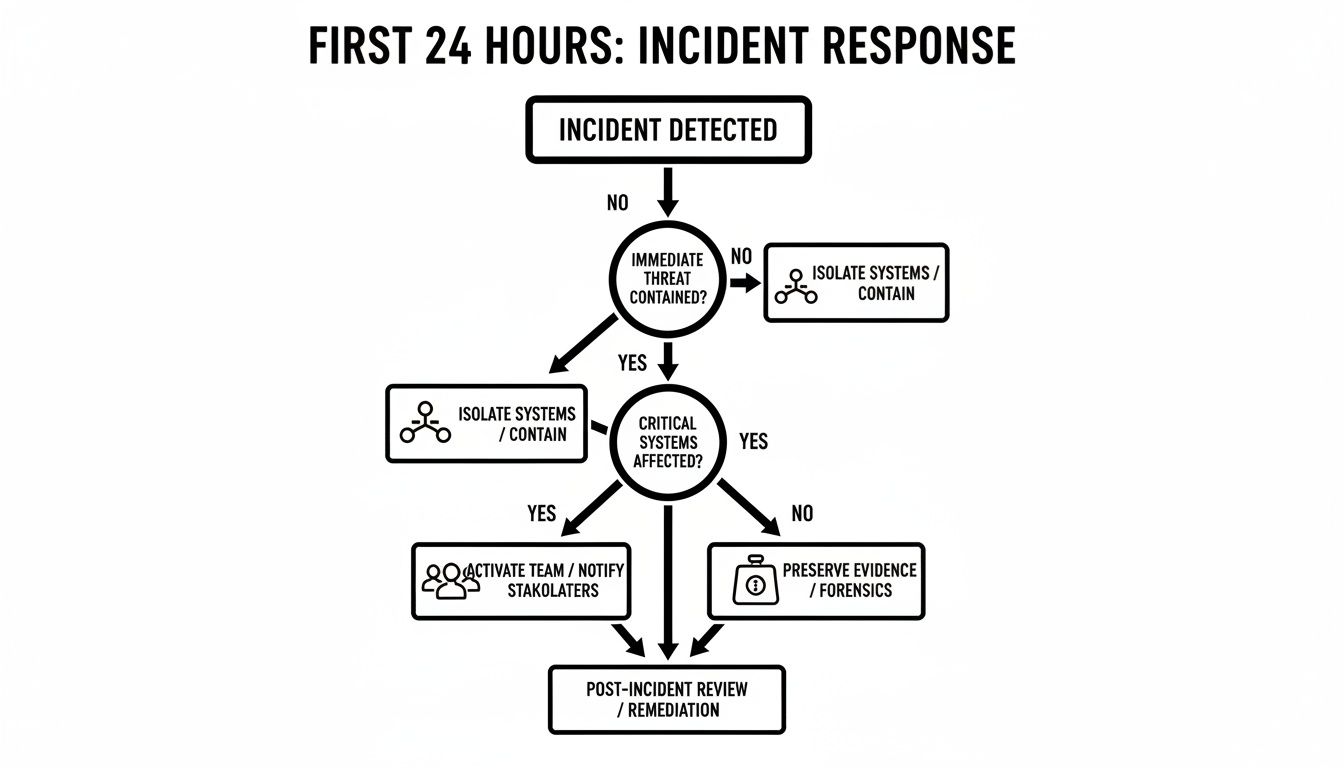
Following a disciplined approach—isolate, activate, and preserve—is what allows you to assess the damage accurately and without panic.
Understanding the Blast Radius
Your first job is to build a detailed inventory of everything the attackers touched. This isn't just a simple list of servers. You need to connect the dots between the encrypted tech and the business operations that rely on it.
- Catalog the Impacted Systems: Get a full list of every single server, workstation, virtual machine, and cloud storage location that's been encrypted or compromised. Be thorough.
- Gauge Data Criticality: Figure out exactly what kind of data is locked up. Is it customer PII? Financial records? Your company’s secret sauce (intellectual property)? Or the operational data that keeps the lights on?
- Map Tech to Operations: This is the key. If your main accounting server is down, what does that actually mean for sending invoices or running payroll? If your CRM is encrypted, how are your sales and support teams supposed to function?
This process is all about triage. You can't fix everything at once, so you have to prioritize based on what gets the core of your business back on its feet the fastest.
The Pay Versus Not Pay Dilemma
This is, without a doubt, one of the most agonizing decisions a leadership team can make. The pressure is immense. When your business is at a dead stop and every hour of downtime costs you thousands, the temptation to just pay the ransom and make it all go away is huge. But let's be clear: paying is a massive gamble with zero guarantees.
Recent data shows a major shift in this area. In 2025, ransomware payment rates have plummeted to a historic low of just 23-25%. More companies are refusing to pay, and it’s saving them millions. Even for those who do pay, the results are grim. A staggering 80% are attacked again, often by the same criminals. Worse, over half (54%) either never get their data back or receive decryption keys that spit out corrupted, useless files. You can dig into more ransomware statistics and recovery trends to see the full picture.
Paying the ransom doesn't buy you a solution. It buys you a chance at a decryption key from an untrustworthy criminal. You’re just funding their next attack, and there is no honor among thieves.
To make the right call, you need to weigh the factors specific to your situation. This decision matrix is designed to guide that tough conversation with your leadership team.
Ransom Payment Decision Matrix
Deciding whether to pay is never black and white. Use these questions to systematically walk through the variables and understand the potential consequences of each path.
| Consideration | Key Questions to Ask | Potential Impact |
|---|---|---|
| Backup Integrity | Are our backups confirmed to be clean and uncompromised? Have we actually tested a restoration from them recently? | If you have solid, verified backups, the argument against paying becomes incredibly strong. This is your best way out. |
| Data Criticality | Is the encrypted data absolutely essential for business survival? Can we operate without it, even for a short time? | The more critical the data, the more pressure you'll feel to consider payment. Be honest about what you can and can't live without. |
| Data Exfiltration | Is there any evidence that the attackers also stole a copy of our data (a "double extortion" threat)? | If sensitive data was already stolen, paying the ransom to decrypt your files won't stop them from leaking it later. |
| Legal & Compliance | Are there any regulations (like OFAC sanctions) that would make paying this specific threat actor illegal? | Violating sanctions can lead to massive fines that could easily be worse than the ransom itself. Get legal counsel involved. |
| Cost Analysis | How does the ransom demand compare to the real-world cost of our downtime and a full manual recovery effort? | This is a purely financial calculation that gives stakeholders a clear, data-driven number to anchor their decision. |
Ultimately, there's no easy answer. The decision rests on a careful, clear-eyed analysis of your risk, your costs, and your operational reality. Armed with a full damage assessment and a structured way to approach this choice, you can move forward with a plan that’s right for your business.
Getting Your Operations Back Online with Secure Backups
Once you've stopped the bleeding and contained the attack, the real work begins: recovery. In the aftermath of a ransomware event, your backups are everything. They're not just a safety net; they are your only reliable path back to business as usual. A successful recovery is 100% dependent on the quality and cleanliness of this data.

But hold on. Diving headfirst into restoring files is a classic mistake that can lead to immediate reinfection. You have to treat your backups with a healthy dose of paranoia, assuming they could also be compromised until you prove otherwise. This careful, methodical approach is the only way to ensure you're rebuilding on solid ground, not on top of a ticking time bomb.
Test Drive Your Backups in an Isolated Sandbox
Before you even dream of connecting a backup to your live network, you have to test it in a safe space. This is a non-negotiable step. The best way to do this is by setting up an isolated sandbox environment—think of it as a digital quarantine zone, completely walled off from your main corporate network.
Inside this secure bubble, you can start restoring a few representative samples from your backups. Spin up some virtual machines and try restoring key files, a critical database, or even a full server image. You have two main goals here:
- Check for Integrity: Is the data actually usable? Can you open the files? Do the databases mount without errors? You need to confirm the data is complete and not corrupted.
- Scan for Malware: Run your most powerful, up-to-date security tools and perform a deep scan. You're hunting for any dormant malware or backdoors that might be hiding within the backup files themselves.
Skipping this verification process is how you end up in a nightmare scenario: restoring all your data, only to watch the ransomware kick off all over again.
Wipe and Rebuild Before You Restore a Single File
Okay, so you've confirmed your backups are clean. Great. Now you can prepare your production systems for the data. You absolutely cannot just restore files onto an infected machine. Those original systems are compromised territory and can't be trusted.
Every single affected device, from your critical servers down to the last workstation, needs to be completely wiped and rebuilt from a known-good, trusted source. This means reformatting the drives and reinstalling the operating system from original media, not a potentially tainted recovery partition. Only after applying all current security patches and updates should a system be reconnected to any network.
Pro Tip: This is where a "golden image" can save you a ton of time and headaches. A golden image is a pre-configured, hardened, and fully patched system template. Rebuilding from one of these speeds up the process immensely and keeps your environment consistent.
Choose the Right Restoration Strategy
Not all data restoration is the same. The right game plan will depend on how widespread the damage is and which systems were hit. You’ll generally be looking at one of two approaches.
- Full System Recovery: This is the "nuke and pave" option. You restore the entire system from a bare-metal backup, which includes the OS, applications, settings, and all the data. It's often the quickest way to get a complex server back online, but it requires that you have a complete, image-level backup to begin with.
- Granular File Restoration: This is a more surgical approach. You restore specific files and folders onto a freshly rebuilt machine. It takes more time and effort but gives you pinpoint control, making it perfect for file servers or situations where only specific datasets were encrypted.
A critical domain controller or a highly customized application server, for instance, is a perfect candidate for a full system recovery. On the other hand, a departmental file share where only a few project folders got hit would be better served by a granular restoration. The foundation of any good recovery is a solid plan, and it's something you need to think about long before you're attacked. For more on this, check out this excellent guide on Crafting a Foolproof Backup and Recovery Strategy Plan.
Prioritize Recovery Based on Business Criticality
You can't bring everything back online at once. Trying to do so is a recipe for chaos that will just prolong the outage. Instead, you need a triage plan based on business impact. Sit down with department heads and company leaders to map out the absolutely essential systems and data required to get the core business running again.
This usually means restoring things in a specific, logical order:
- Core Infrastructure: Start with the basics. Get services like Active Directory, DNS, and DHCP running first. Nothing else works without them.
- Mission-Critical Applications: Next, focus on the systems that make money or deliver your product. This could be your ERP, CRM, or primary production platform.
- Operational Systems: With the core business running, move on to systems that support daily work, like email and internal file shares.
- Less Critical Systems: Finally, you can circle back to individual workstations and other lower-priority assets.
This tiered approach gets the business back on its feet faster and with less friction. Organizations that get this right see dramatically better outcomes. In fact, in 2025, 54% of ransomware victims were able to restore their encrypted data from backups, and an impressive 53% of those were back in business within a week. That's a huge improvement from 35% the year before. By methodically verifying, rebuilding, and prioritizing, you can turn a potential catastrophe into a structured, successful recovery operation.
Hardening Your Defenses After the Attack
Getting your data and systems back online feels like crossing the finish line, but the race isn't over. In many ways, it’s just beginning. The aftermath of a ransomware attack is a critical window—a chance to turn a disaster into a powerful catalyst for building a much tougher, more resilient organization.
Simply restoring everything to its pre-attack state is like rebuilding a house on a shaky foundation. You’re just waiting for it to crumble again.

This is your moment to take the hard-won lessons from the incident and methodically strengthen every layer of your security. It’s not about plugging one hole; it's about fundamentally shifting your mindset from reactive to proactive.
Use Forensic Insights to Close the Door for Good
Your post-incident forensic report is probably the most valuable document you have right now. It's a detailed roadmap showing exactly how the attackers got in, how they moved around your network, and how they pulled off the attack. Your first, most urgent task is to take that intel and act on it.
For instance, if the report points to a compromised RDP port as the entry point, the answer isn't just a new password. The real fix is shutting down all public-facing RDP and switching to a secure VPN with multi-factor authentication. If a phishing email was the culprit, it’s time to double down on employee security training and deploy smarter email filtering.
The goal is to make it impossible for the same attack vector to ever be used against you again. This isn't just patching; it's re-architecting your security based on real-world attack data.
Implement High-Impact Security Controls Now
Once you've slammed the door on the initial entry point, you need to zoom out. It's time to roll out security controls that make life much harder for attackers across your entire environment. These aren’t just theoretical best practices—they are practical, high-impact moves proven to stop the majority of common threats.
Start with these non-negotiables:
- Enforce Multi-Factor Authentication (MFA) Everywhere: This is the single most effective control you can implement. Make MFA mandatory for all accounts, especially for remote access, email, and anyone with admin privileges.
- Apply the Principle of Least Privilege: Take a hard look at every user and service account. Does every user really need admin rights on their laptop? Does that one application’s service account need access to the entire database? Strip permissions down to the bare minimum required for each person or service to do its job.
- Enhance Network Segmentation: A flat network is an attacker’s playground. It allows them to move from a compromised workstation to your most critical servers with ease. Break your network into smaller, isolated zones. That way, if one segment is hit, firewall rules can contain the breach and keep it away from your crown jewels.
Conduct a Thorough Security and Policy Review
An attack is a clear sign that your existing security policies and procedures failed somewhere along the line. Now is the time for a brutally honest, top-to-bottom review of your entire security program. This audit needs to cover everything, from technical settings to human processes.
Key Areas for Review
| Security Domain | Questions to Ask | Actionable Outcome |
|---|---|---|
| Patch Management | Were critical systems missing security patches? Is our patching schedule aggressive enough? | Implement an automated and proactive patch management policy, prioritizing critical vulnerabilities. |
| Password Policies | Are we enforcing strong, unique passwords? Are we actively checking for compromised credentials? | Revise password policies to exceed industry standards and deploy tools to monitor for credential leaks. |
| Security Awareness | Do our employees know how to spot and report phishing? Is training a one-off event or continuous? | Launch an ongoing security awareness program with regular simulated phishing tests and training. |
This process of hardening and review is intense, and frankly, it requires specialized expertise. Many businesses find that partnering with a managed security provider is the most effective way to ensure these crucial improvements are done right. Exploring professional cybersecurity services can give you the expert guidance and hands-on help needed to build a truly robust defense, turning the lessons of an attack into lasting security.
Navigating Legal Compliance and Notification Obligations
Getting your data back after a ransomware attack feels like a massive win, but don't pop the champagne just yet. The fight isn't over. Now you're stepping onto a different kind of battlefield—one filled with legal, regulatory, and contractual obligations.
This phase is less about bits and bytes and more about managing transparency, compliance, and your hard-earned reputation. Getting this wrong can lead to staggering fines and legal trouble that can dwarf the cost of the ransomware itself. It's a non-negotiable part of a full recovery.
This is precisely when you need to get experienced legal counsel on the phone. It's not optional; it's essential. A lawyer who lives and breathes cybersecurity and data privacy law will be your guide through the maze of regulations that apply to your specific situation and the data that was hit.
Understanding Your Regulatory Landscape
Your notification duties aren't a simple checklist. They're a complex web determined by your industry, where you operate, and the kind of data you handle. For many businesses, it’s not just one rule, but several overlapping ones.
Healthcare (HIPAA): If you touch any protected health information (PHI), the Health Insurance Portability and Accountability Act (HIPAA) comes into play with some very strict breach notification rules. In the eyes of HIPAA, a ransomware attack is a breach until you can prove it wasn't.
Financial Services: Banks, investment firms, and other financial institutions are governed by a patchwork of regulations like the Gramm-Leach-Bliley Act (GLBA) and state-level mandates that demand quick reporting to both regulators and customers.
Personal Data (GDPR, CCPA): Holding data on EU or California residents? Then you're on the hook for the General Data Protection Regulation (GDPR) or the California Consumer Privacy Act (CCPA). Both come with huge fines and very short deadlines—GDPR gives you just 72 hours to report a breach.
And that's just scratching the surface. Your legal team is crucial here. They’ll pinpoint every single applicable law and help you craft notifications that meet each one's unique requirements for timing, content, and delivery.
When to Involve Law Enforcement
Beyond regulatory bodies, you’ve got a big decision to make about calling law enforcement. I always strongly recommend reporting the attack to agencies like the FBI or CISA. They don’t just file a report and walk away; they can be an incredible asset.
Getting them involved offers real, practical benefits:
- They often have intel on the specific ransomware gang that hit you.
- In some cases, they might even have decryption keys recovered from past takedowns.
- Your cyber insurance policy will almost certainly require an official report to process a claim.
When you report a ransomware attack, you’re not just helping yourself. You’re feeding into a larger intelligence effort that helps authorities track, disrupt, and dismantle these criminal organizations. Your report is part of a collective defense.
Notifying Customers and Partners with Transparency
This is the part everyone dreads, but you absolutely have to nail it. The way you communicate what happened will define your relationship with customers, vendors, and partners for years to come. The goal is to be honest and transparent without causing a full-blown panic.
Work hand-in-glove with your legal and communications teams to get the messaging right. It needs to be clear, direct, and, above all, truthful.
Key Elements of a Customer Notification:
- A straightforward, jargon-free summary of the incident.
- The specific types of personal information that might have been compromised.
- The steps you’ve already taken to lock down your systems and respond.
- What you're doing to help people, like offering free credit monitoring services.
- A dedicated phone number or email so people can get their questions answered.
Finally, don't forget about the physical hardware. If you have to decommission drives or servers that held sensitive data, you need to prove they were disposed of securely. Getting a Hard Drive Destruction Certificate for Compliance and Risk Reduction is non-negotiable. It provides the official, legally-binding proof you'll need for audits and to demonstrate you did everything by the book. Handling these obligations with care and expert guidance is how you minimize further damage and start rebuilding trust.
Your Top Ransomware Recovery Questions Answered
When you're in the middle of a ransomware attack, the pressure is immense and the questions come fast. Business leaders and IT teams are forced to make high-stakes decisions with very little time. Let's cut through the noise and get you the straightforward answers you need.
How Long Does It Really Take to Recover?
This is the million-dollar question, and the answer is always, "It depends." I've seen organizations with well-tested incident response plans and clean, air-gapped backups get critical systems back online within a week. They had a plan, they practiced it, and it worked.
On the other hand, if you're scrambling to find usable backups—or worse, you don't have any—you could be looking at weeks or even months of manual, soul-crushing rebuilding from scratch. The two things that make all the difference are the quality of your backups and having a recovery plan you've actually rehearsed.
Should We Call Law Enforcement?
Absolutely. You should get agencies like the FBI involved right away. They're more than just a reporting body; they can be a genuine ally in your recovery effort. These teams have access to intelligence on the attackers, and in some rare but welcome cases, they might even have decryption keys recovered from previous takedowns of ransomware gangs.
Beyond that, reporting the crime is almost always a requirement to file a claim with your cyber insurance provider. Your cooperation also feeds into a much larger intelligence pool, helping law enforcement track these criminal groups and protect the next business they try to hit.
Paying a ransom offers no guarantee you'll get your data back. We've seen far too many cases where a business pays up only to get a broken decryption key—or nothing at all.
If We Pay the Ransom, Will We Get Our Data Back?
Paying the ransom is a huge gamble, and it's one I never recommend. You're dealing with criminals. Once they have your money, there's zero incentive for them to make good on their promise. In fact, paying often puts a giant target on your back, flagging you as an easy mark for future attacks.
Even if you get a decryption key, the process is notoriously slow and unreliable. It often fails, leaving you with a mess of corrupted, unusable files. The only reliable path forward is a solid recovery plan built on robust, tested backups. It takes the "pay or don't pay" dilemma off the table entirely. This is why understanding the importance of cybersecurity for growing businesses before an incident is so critical.
When Is the Right Time to Call in an Incident Response Team?
The moment you even suspect a breach. Don't wait. In a ransomware attack, every minute counts, and the expertise a professional incident response (IR) team brings can be the difference between a contained incident and a full-blown catastrophe.
Think of them as the special forces for a cyber crisis. They immediately start to:
- Stop the bleeding by containing the ransomware so it can't spread further.
- Preserve the evidence correctly, which is crucial for forensics and insurance.
- Steer the recovery process, from validating your backups to rebuilding and hardening your systems.
Their experience helps you sidestep the common mistakes that get made in the heat of the moment, which will dramatically speed up your recovery and increase your chances of a successful outcome.
A ransomware attack can feel like an existential threat. You don't have to face it alone. Defend IT Services brings specialized incident response and cybersecurity expertise to the table, guiding you through the recovery and helping you build a stronger, more resilient organization. Contact us to see how we can help. https://defenditservices.com