
Adopting a Zero Trust security model means throwing out the old "castle-and-moat" playbook. For decades, we were taught to build a strong perimeter and trust everything inside it. That approach just doesn't work anymore.
The new rule is simple but profound: never trust, always verify. Every single request to access your data must be checked, every time, no matter where it's coming from.
Shifting to a Modern Security Mindset
Forget the comfortable idea that your internal network is a "safe zone." In a world of remote work, cloud apps, and constant cyber threats, that assumption is a dangerous liability. Moving to Zero Trust isn't about installing a single new tool; it's a complete shift in your security culture that protects your business from the inside out.

The traditional security perimeter has evaporated. Your people are accessing sensitive files from their home offices, local coffee shops, and airport lounges. They're using a mix of company laptops and personal devices. Each of these situations creates a potential entry point that a simple firewall can't defend.
The Core Pillars of a Zero Trust Architecture
To really get Zero Trust right, you have to build on a few foundational concepts. Think of these as the non-negotiable pillars of your security strategy. They guide every decision you make and form the basis of a truly resilient defense.
| Pillar | Core Principle | Example Action |
|---|---|---|
| Identity Verification | Authenticate and authorize every user for every session. | Requiring multi-factor authentication (MFA) via an app like Okta or Duo before granting access. |
| Device Health | Continuously assess the security posture of every endpoint. | Blocking access from a laptop that is missing critical OS patches or has its antivirus disabled. |
| Least-Privilege Access | Grant the minimum level of access required to perform a job function. | Giving an accountant access to financial software but not to the source code repository. |
| Micro-segmentation | Isolate workloads and secure them individually. | Placing a customer database in its own secure network segment, separate from the marketing website. |
These pillars work together to create a layered defense that is far more effective than a traditional perimeter alone.
Let's walk through a practical example. A sales executive tries to open your CRM from their personal iPad while on the hotel's public Wi-Fi.
Under the old model, they might connect to a VPN and get broad access to the entire network. With Zero Trust, the system first verifies their identity with MFA. It then checks their iPad to ensure it meets your company's security requirements (e.g., updated OS, screen lock enabled). Only then does it grant temporary, direct access only to the CRM application—not the whole network. This granular control is the heart of Zero Trust.
It's no surprise that by 2025, an estimated 81% of organizations worldwide will have fully or partially implemented a Zero Trust model. The trend is clear. To learn more about this industry-wide shift, the insights on cloud security from StrongDM are a great resource.
The core idea is simple but powerful: assume every access request is a potential threat until it's proven otherwise. This proactive stance is essential for protecting a modern, distributed workforce.
Understanding the importance of cybersecurity for growing businesses highlights why this change is so critical. By adopting this mindset, you're not just adding another security layer—you're fundamentally rethinking how to protect what matters most.
Getting the Lay of the Land: Auditing Your Environment for Zero Trust
Before you can even think about implementing a Zero Trust security model, you need a crystal-clear picture of your current IT environment. Think of it as creating a detailed blueprint. This isn’t just about ticking off boxes on a technical checklist; it’s a deep dive into what you own, where your most valuable data lives, and how it all talks to each other.
Jumping straight into buying and deploying new tech without this foundational map is a recipe for disaster. It’s like trying to build a house without surveying the land first—you're guaranteed to end up with a shaky foundation and critical gaps in your security.

Your first move? Create a complete inventory. This means tracking down and cataloging every single asset that connects to your network. The goal here is total visibility, because you simply can't protect what you don't know you have.
This inventory needs to cover four main areas:
- Identities: This is everyone and everything with access. It includes all your human users (employees, contractors, vendors) as well as non-human accounts like service accounts and API keys.
- Devices: Get a handle on every endpoint. We're talking company laptops and servers, personal devices used for work (the whole BYOD scene), and even IoT devices like security cameras or smart thermostats.
- Applications: List all the software your business relies on. This runs the gamut from old-school, on-premise software to the modern cloud-based SaaS platforms you use daily, like Salesforce or QuickBooks.
- Data: Pinpoint exactly where your information is stored. This could be in databases, on file servers, or scattered across various cloud storage buckets.
Following the Data: Mapping Critical Flows
Once you know what you have, the next logical step is to figure out how it all interacts. You need to map the transaction flows to see the actual paths your data takes as it moves across the network. Who is accessing the customer database, and from which specific applications? How does financial data get from your billing system over to your analytics platform?
This process uncovers the complex web of connections that make your business run. It's a fantastic way to spot which interactions are legitimate and which might be old, forgotten permissions that no longer make sense. A great way to formalize this is by conducting a comprehensive security risk assessment, which helps you systematically identify the vulnerabilities hiding in these data flows.
For example, you might discover that a marketing service account has full read/write access to a sensitive development server. That’s a classic case of over-privileged access just waiting to be exploited. When you map these flows, dangerous configurations like that become impossible to ignore.
The real goal of this audit isn't just to make a list. It's to understand the relationships between your assets. That context is what will empower you to build smart, granular security policies down the road.
Classifying Your Data to Define Your "Protect Surface"
Let's be honest: not all data is created equal. The marketing copy on your public website doesn't need the same Fort Knox-level security as your customers' personal information or your company's financial records. This is where data classification becomes so important.
You'll want to create a simple, clear system for categorizing data based on how sensitive it is. A common approach uses a few tiers:
- Public: Info meant for public consumption. No confidentiality needed.
- Internal: Data for internal business use that isn't highly sensitive but shouldn't be shared outside the company.
- Confidential: Sensitive information that could cause moderate harm to the business or clients if it leaked.
- Restricted: Your crown jewels. This is the most critical data—trade secrets, PII, financial data—where a breach would have severe consequences.
Once your data is classified, you can define your protect surface. This isn't your entire sprawling network; it's a much smaller, more manageable zone that contains only your most critical data, assets, applications, and services.
From there, you build your Zero Trust security controls outward from this core. This ensures your most valuable resources get the highest level of protection first, making the whole implementation process far more focused and effective—a huge win, especially for businesses with limited time and resources.
Choosing Your Zero Trust Technology Stack
Zero Trust isn't a single product you buy off the shelf; it's a strategic philosophy. But to bring that philosophy to life, you need the right technology. The goal isn't to find one magic box but to assemble a stack of tools that work together, constantly enforcing the "never trust, always verify" mantra.
Think of it like building a modern airport's security checkpoint. You need agents to verify IDs, scanners to check baggage, and secure gates that only open for ticketed passengers. Each piece has a specific job, but they have to operate in perfect sync to keep things secure.
The Cornerstone: Identity and Access Management
In a Zero Trust world, identity is the new perimeter. If you can't be certain who is making a request, everything else falls apart. This makes Identity and Access Management (IAM) the absolute foundation of your architecture. Modern IAM goes way beyond a simple list of usernames and passwords; it's a dynamic system that continuously manages and verifies every digital identity trying to connect.
The most crucial feature here is Multi-Factor Authentication (MFA). It's completely non-negotiable. By requiring a second form of verification—like a code from an app, a physical key, or a biometric scan—you dramatically shrink the attack surface from compromised credentials. Your technology stack has to start with strong identity verification. This could even mean exploring advanced approaches like biometric authentication solutions for platforms like Dataverse to really lock down access.
Industry data backs this up. A full 67% of organizations prioritize IAM and data encryption as they build out their security frameworks. It's a powerful one-two punch: IAM confirms only verified people get in, and encryption protects the data no matter where it is.
Next Up: Validating Device Health and Posture
Okay, so you've verified the user. But what about their device? A trusted employee logging in from a malware-riddled personal laptop is a recipe for disaster. This is where Endpoint Detection and Response (EDR) and Unified Endpoint Management (UEM) tools earn their keep.
These solutions act like a health inspector for every single device that requests access. They’re constantly asking critical questions:
- Is the OS fully patched?
- Is the antivirus running and up to date?
- Is the device firewall active?
- Are there any signs of an active threat?
If a device fails this health check, it's denied access until the problems are resolved. This continuous, real-time validation is the engine that drives a Zero Trust model.
Pro Tip: Your access policies must be conditional. Access shouldn't just depend on who you are, but also on the security posture of the device you're using at that very moment.
Enforcing Least Privilege with Network Controls
The final piece of the puzzle is tightly controlling what users and devices can do after they've been authenticated and validated. Here, the principle of least privilege is enforced through smart network technologies, primarily micro-segmentation.
Forget the old flat network where anyone on the inside could see everything. Micro-segmentation carves your network into tiny, isolated zones. It’s like installing fire-rated, keycard-access doors between every single office, not just at the front entrance of the building.
This is typically done using:
- Software-Defined Perimeters (SDP): Creates a secure, one-to-one connection between a user and the specific resource they need, making the rest of the network totally invisible to them.
- Next-Generation Firewalls (NGFW): Enforces granular access rules based on user identity and application, not just old-school IP addresses.
For instance, an employee on the marketing team could get access to the content management system but be completely firewalled off from the finance department's servers. Even if their account was somehow compromised, the attacker would have nowhere to go.
Core Zero Trust Technology Comparison
Choosing the right blend of tools can feel overwhelming. This table breaks down the core technology categories to help you understand their role and what to look for when you're evaluating options.
| Technology Category | Primary Function | Key Features to Look For |
|---|---|---|
| Identity & Access Management (IAM) | Verifies user identity and enforces access policies. | SSO, MFA (with phishing-resistant options), adaptive access controls, user provisioning/deprovisioning. |
| Endpoint Detection & Response (EDR) | Monitors endpoints for threats and ensures device health. | Real-time threat detection, automated response, vulnerability assessment, device compliance checks. |
| Micro-segmentation / SDP | Isolates workloads and limits lateral movement. | Granular policy enforcement, application-level segmentation, dynamic policy updates, network invisibility. |
| Cloud Access Security Broker (CASB) | Secures data and enforces policy in cloud apps. | Data loss prevention (DLP), threat protection, visibility into sanctioned/unsanctioned apps, compliance reporting. |
Ultimately, these technologies need to integrate and share signals to create a truly dynamic and responsive security posture.
Putting these pieces together correctly requires expertise. This is often where partnering with specialists in cybersecurity services can make a huge difference, ensuring every component of your security framework functions as a cohesive, unified system.
How to Deploy Zero Trust Without Derailing Your Business
The thought of a complete security overhaul is daunting. It’s the kind of thing that can lead to "analysis paralysis." Many organizations are tempted by a "big bang" approach—trying to flip the switch on every Zero Trust principle at once. From my experience, that's a surefire recipe for disrupting operations, frustrating everyone, and ultimately, failing.
The real key to a successful Zero Trust implementation is to see it as a journey, not a destination. It's an iterative process.
A phased deployment lets you build momentum. You can demonstrate quick wins, get crucial buy-in from leadership, and show your team that this new model actually makes things better. By starting small with a high-impact, low-risk project, you create a controlled environment to test and fine-tune your policies before rolling them out more broadly. This methodical approach is how you improve security without causing chaos.
This process flow shows the core components—Identity, Device, and Network—that form the foundation of a Zero Trust stack.
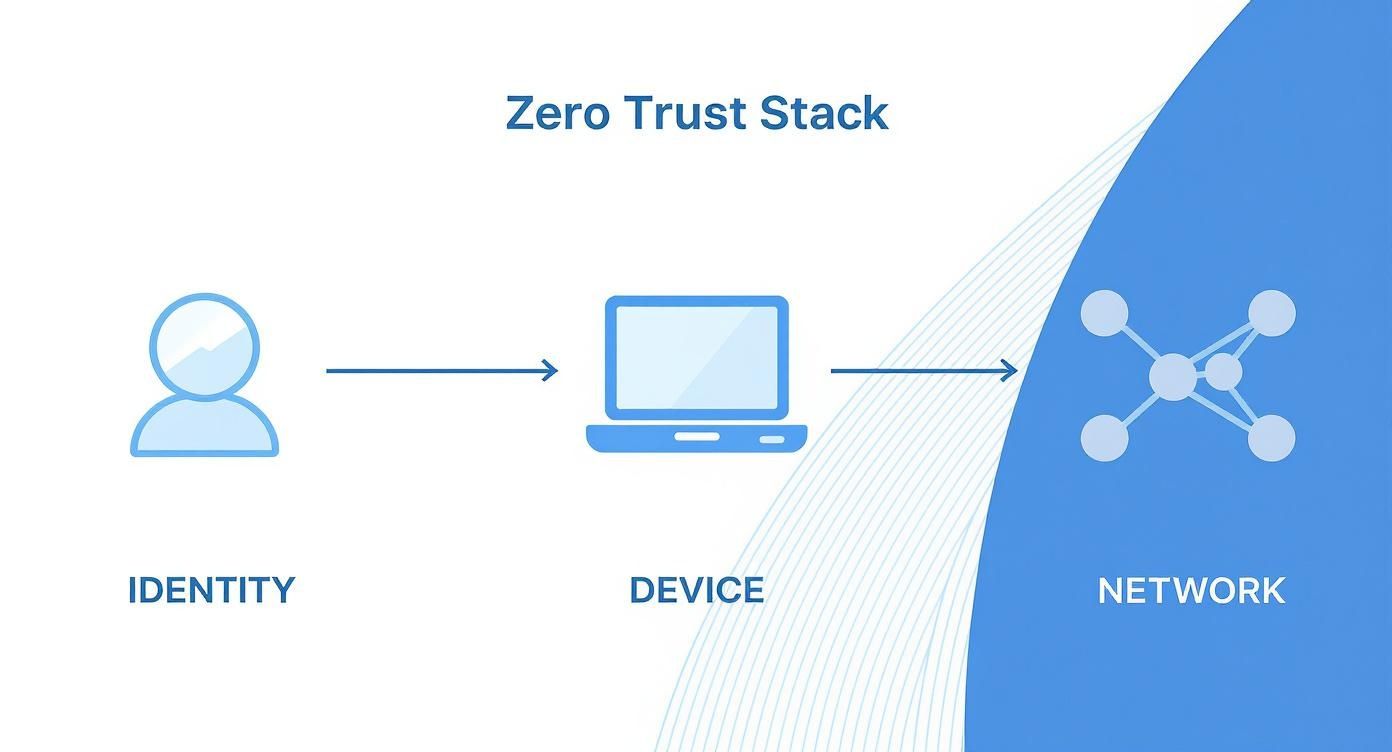
You can see how each element is a distinct but connected pillar. Every single access request has to be scrutinized through these three lenses before it gets a green light.
Phase One: Your Pilot Project
Your first move into Zero Trust needs to be surgical. The goal here is to secure a specific, well-understood corner of the business where you can score a clear security win. This not only proves the concept works but also gives you invaluable lessons for the next phases.
So, where do you start? Excellent candidates for a pilot project usually fall into one of these buckets:
- A Single Critical Application: Pick one high-value SaaS app, like your CRM or accounting platform. Just implementing strong identity verification (MFA) and conditional access policies for that single application is a perfect, manageable first step.
- A Specific User Group: You could focus on a team with a clear risk profile, like your remote sales team or a handful of third-party contractors. Securing their access gives you immediate risk reduction and lets you test policies on a contained, predictable group.
- Privileged Account Access: Honestly, this is one of the most impactful things you can do. Start by enforcing MFA and just-in-time access for your IT admins when they log into critical servers or network gear.
Let's take a real-world example. A healthcare clinic could start by applying Zero Trust controls only to their Electronic Health Record (EHR) system. They'd enforce mandatory MFA for all clinical staff and run device health checks to ensure only compliant, clinic-owned devices can access patient data. This one project dramatically reduces a massive risk without changing how the front desk schedules appointments.
The most successful Zero Trust journeys begin with a single, well-defined step. Pick one area, secure it completely, learn from the process, and then expand your efforts from that solid foundation.
This gradual approach is absolutely essential. It’s a marathon, not a sprint. In fact, despite high awareness, with over 86% of organizations having started their journey, only about 2% have achieved full maturity. This gap highlights just how complex it is, making a phased rollout the only realistic path forward. You can review the full report from Cisco on Zero Trust outcomes to see the data for yourself.
Phase Two: Expanding Your Controls
With a successful pilot under your belt, it's time to build on that momentum. The lessons you learned will directly inform how you expand your Zero Trust footprint. This next phase is all about taking your core security controls and applying them more broadly.
Your expansion roadmap should prioritize these next steps:
- Universal MFA Rollout: Take the MFA policies from your pilot and start applying them to all users across all critical applications. This is arguably the single most effective security control you can implement. Period.
- Broader Device Health Integration: Now, extend device compliance checks beyond that initial pilot group. You can start by enforcing basic hygiene policies—like requiring up-to-date operating systems and active endpoint protection—for any device trying to access company resources.
- Initial Network Micro-segmentation: Identify your "crown jewel" data assets. This could be a customer database or your intellectual property repository. Use network controls to build a secure micro-segment around this data, tightly restricting which users and applications can even talk to it.
Imagine a financial services firm that successfully secured its accounting software in phase one. In phase two, they would roll out MFA to all employees for email and cloud storage. They would also create a protected network segment just for their client investment database, making sure only validated users from the wealth management team can access it.
Phase Three: Maturing and Automating
The final phase is where it all comes together. It's about refining your policies, deepening your visibility, and automating enforcement to create a truly dynamic security posture. At this stage, your Zero Trust model becomes less about manual configurations and more of an adaptive, self-defending ecosystem.
Key initiatives in this mature phase include:
- Automated Policy Enforcement: Let your security tools do the heavy lifting. For instance, if an EDR tool detects malware on a laptop, an automated policy should instantly revoke that device's access to everything until it's clean.
- Continuous Monitoring and Logging: Pull logs from all your security tools (IAM, EDR, network devices) into a central platform. This gives you the complete visibility needed to hunt for threats, analyze access patterns, and tweak policies based on real-world data.
- Advanced Risk-Based Access: This is where you move beyond static rules to dynamic, risk-based policies. The system should continuously assess risk signals—like a user logging in from an unusual location or a device failing a health check—and adjust access privileges in real time.
By breaking the deployment into these manageable phases, you transform an overwhelming project into a strategic, step-by-step process. This measured approach is exactly how you implement Zero Trust without disrupting the very business you're trying to protect.
Maintaining and Optimizing Your Zero Trust Model
Getting a Zero Trust architecture up and running is a huge win, but it’s definitely not a "set it and forget it" project. Think of it less like building a fortress and more like maintaining a high-performance engine. It needs constant attention, fine-tuning, and care to keep it running at peak condition. The threat landscape is always shifting, your business is growing, and your security has to keep pace.
This ongoing commitment is what separates a basic implementation from a truly mature security program. It’s about building a living, breathing system that adapts to protect you from whatever comes next.
The Power of Continuous Monitoring
You can't protect what you can't see. It's an old saying, but it’s the absolute truth in security. This is why continuous monitoring, logging, and analytics are the heartbeat of any healthy Zero Trust model. Every single access request, policy decision, and device health check is a breadcrumb. Collecting and analyzing these breadcrumbs is your best shot at spotting trouble before it turns into a full-blown crisis.
Your real goal here is total visibility. That means pulling in data from every piece of your security stack.
- Identity Systems: Look at sign-in logs. Are you seeing impossible travel scenarios, weird login times, or a spike in failed MFA attempts from a single account?
- Endpoint Tools: Keep tabs on device compliance. You need to know instantly if a device is missing patches, has malware, or falls out of compliance for any reason.
- Network Firewalls: Watch the traffic flows. This is how you confirm your micro-segmentation rules are working and catch any attempts at lateral movement dead in their tracks.
- Cloud Platforms: Monitor your cloud environments for sketchy configuration changes or unusual data access patterns.
This 360-degree view lets your team connect the dots. A single failed login attempt is just noise. But a pattern of them from different locations targeting a finance executive? That’s a signal you can't ignore.
Establishing a Rhythm for Policy Refinement
Your business doesn’t stand still, and neither can your security policies. Every time you bring on a new hire, roll out a new app, or adopt another cloud service, your access rules need to be updated. A policy that was air-tight six months ago could be full of holes today.
This is why you have to get into a regular rhythm of reviewing and refining your Zero Trust policies. This isn't a once-a-year audit; it's a constant cycle of improvement.
A mature Zero Trust environment is dynamic. It's always learning from new data and sharpening its defenses. Every business change should be seen as a chance to reassess and strengthen your security controls.
For instance, when your marketing team adopts a new project management tool, you need a clear process. Who gets access? What privileges do they really need? How will that access be governed over time? Likewise, your offboarding process has to be ironclad, ensuring that when an employee leaves, their access to everything is cut off instantly. In a Zero Trust world, these routine business activities are critical security events.
Embracing Automation to Reduce Manual Toil
As your Zero Trust environment matures, trying to manage everything by hand becomes a losing battle. The sheer volume of access requests, device checks, and log data will quickly bury even the best security team. This is where automation becomes your secret weapon.
Automating your policy enforcement doesn’t just cut down on manual work; it shrinks your response time from hours to milliseconds. An automated system can revoke access long before a human analyst even finishes reading an alert.
Here are a few high-impact areas where you can start automating:
- Automated Incident Response: If your endpoint detection and response (EDR) tool spots a malicious process on a laptop, an automated workflow can instantly quarantine that device from the network, stopping the threat from spreading.
- Dynamic Access Control: You can set up policies that automatically adjust access based on real-time risk. For example, if a user tries to sign in from an unrecognized country, the system could automatically limit their access to only non-sensitive apps until they re-verify their identity.
- User Provisioning and Deprovisioning: Link your HR system directly to your identity and access management (IAM) solution. A new employee is added to the HR system, and their accounts are automatically created with the right, least-privilege permissions. When they leave, all that access is automatically shut down.
By weaving continuous monitoring, regular policy reviews, and smart automation into your day-to-day operations, you move Zero Trust from a one-off project to a resilient, adaptive security program that can truly protect your business for the long haul.
Common Questions We Hear About Zero Trust
When you start moving Zero Trust from a whiteboard concept to a real-world project, a lot of practical questions pop up. It's totally normal. Getting these things clarified upfront can make the whole process feel less daunting and a lot more achievable.
Let's walk through some of the most common questions we get from businesses making this transition.
What Are the Biggest Roadblocks to a Smooth Rollout?
Honestly, the biggest challenge is rarely the technology itself—it's the people. You're fundamentally changing the company culture from "trust but verify" to "never trust, always verify." That's a huge mental shift. Getting everyone from the C-suite to the front-line staff on board is crucial. Expect some pushback when people have to use multi-factor authentication for everything they used to access freely.
The other major headache is legacy tech. Many older applications, especially those tucked away on-premise, just weren't built for modern security protocols. Trying to wrap them into a Zero Trust framework can mean getting creative with workarounds or, more often, making a hard decision to modernize or replace them. That can definitely affect your budget and timeline.
My best advice? Start small. Pick one critical application or a small, tech-savvy team for a pilot project. It lets you prove the concept, iron out the wrinkles, and build some real momentum before you go big.
How Does Zero Trust Fit with the Security Tools I Already Have?
This is a great question because nobody wants to throw out their entire security investment. The good news is, you don't have to. Zero Trust is more of an integration strategy; it makes your existing tools smarter by connecting the dots between them.
Think of it like this:
- Your Firewall: It's still your perimeter and internal traffic cop, but now it’s essential for creating the smaller, isolated network zones needed for micro-segmentation.
- Your Endpoint Protection (EDR): The data from your EDR about device health is pure gold. Is the device patched? Is malware present? That info becomes a key signal in deciding whether to grant access.
- Your Identity Provider (IdP): Tools like Azure Active Directory or Okta become the absolute heart of your setup. They are the gatekeepers for user identity, which is the foundation of everything in Zero Trust.
Zero Trust simply orchestrates these tools, using signals from each to make a real-time, context-aware decision every time someone or something tries to access a resource.
Isn't Zero Trust Just for Big Corporations?
Not at all. In fact, you could argue it's even more important for small and midsize businesses (SMBs). Attackers love targeting SMBs because they often assume their defenses are weaker. Zero Trust levels the playing field.
The beauty of modern, cloud-based security is its scalability. You don't need a massive upfront capital investment. You can start with the basics—like enforcing MFA everywhere and getting a handle on device compliance—and build from there. It allows you to grow your security maturity right alongside your business. If you're looking for more security ideas for a growing company, we cover a lot of ground on our cybersecurity blog.
How Do I Know if It's Actually Working?
Measuring the success of a Zero Trust implementation goes beyond just blocking threats. You need to look for metrics that show a fundamental improvement in your defensive posture.
Here are a few KPIs we track with our clients:
- A sharp drop in successful phishing attacks. When MFA is everywhere, stolen passwords become nearly useless.
- Faster threat detection times. With better visibility and continuous monitoring, you'll spot intruders much quicker, which drastically reduces your Mean Time to Detect (MTTD).
- Fewer signs of lateral movement. If an attacker does get in, good micro-segmentation should stop them from moving around your network. You'll see this in your incident reports.
- An increase in access denials due to device non-compliance. This sounds negative, but it's a great sign! It means your policies are actively stopping risky devices from connecting to your data.
When you can show improvements in these areas, you're building a clear case for the value your Zero Trust strategy is delivering.