

Think of a cybersecurity risk assessment template as your blueprint for digital defense. It’s a structured document you can use over and over again to methodically spot, analyze, and rank the digital threats aimed at your organization. This framework provides a standardized process, ensuring you don't miss any critical vulnerabilities and giving you a clear roadmap for fixing them.
Why a Standardized Risk Assessment Matters
Relying on scattered notes and ad-hoc spreadsheets just doesn’t cut it anymore. A formal, structured approach to risk management is now a basic requirement for business survival and growth. Without a consistent process, your teams will likely talk about risk in different ways, which leads to confusion, wasted effort, and dangerous gaps in your defenses.
A well-crafted cybersecurity risk assessment template serves as a common language for everyone involved. It establishes a repeatable method that closes the communication gap between your tech experts, finance department, and executive leaders. When everyone from the CISO to the CFO can clearly see a threat's potential impact and understand why security investments are needed, you can finally make smart, strategic decisions together.
Creating a Common Language for Risk
When each department has its own way of measuring threats, you end up with a confusing and unreliable picture of your actual risk. A standardized template solves this by forcing the entire organization to use the same playbook—the same criteria for evaluating risks, the same definitions for impact levels, and the same logic for prioritizing what to fix first. This consistency isn't just for internal alignment; it's absolutely essential for passing external audits and proving you’ve done your due diligence.
This kind of structured approach is especially critical if you're dealing with complex regulations like GDPR or HIPAA. It helps ensure you're aligned with global standards like ISO 27001, which form the bedrock of many effective risk management programs.
A standardized template transforms risk assessment from a subjective art into a repeatable science, enabling accurate measurement and continuous improvement over time.
Driving Compliance and Faster Threat Detection
Proven frameworks from organizations like NIST and ISO are the gold standard for a reason—they offer a defensible methodology that regulators know and trust. It's no surprise that their adoption is on the rise, with over 60% of large companies in the US and EU now using them as a reference.
The data speaks for itself. Standardization helps companies slash their average breach detection time by 40% and reduce procedural errors by up to 35%. With new rules like the EU’s NIS2 Directive carrying fines of up to €10 million for non-compliance, using a repeatable template is more important than ever.
Ultimately, this methodical process strengthens your entire security posture, which is a key part of understanding https://defenditservices.com/the-importance-of-cybersecurity-for-growing-businesses/.
Core Elements of a Powerful Risk Assessment Template
So, what should you look for in a good template? A truly effective one goes beyond a simple checklist. It provides a comprehensive framework for documenting and analyzing every facet of a potential threat.
The table below breaks down the essential components you'll find in a robust cybersecurity risk assessment template. Think of it as a quick reference guide to ensure the template you choose—or build—has everything you need.
| Component | Purpose | Example |
|---|---|---|
| Asset Identification | To list and categorize all valuable company assets. | Servers, employee laptops, customer databases, intellectual property. |
| Threat Identification | To brainstorm and list potential threats to each asset. | Malware attacks, phishing scams, insider threats, hardware failure. |
| Vulnerability Analysis | To identify weaknesses that a threat could exploit. | Unpatched software, weak password policies, lack of employee training. |
| Risk Likelihood & Impact | To score the probability of a threat occurring and its potential damage. | Likelihood: (Low/Medium/High), Impact: (Financial loss, reputational damage). |
| Control Measures | To document existing security controls that mitigate risks. | Firewalls, multi-factor authentication (MFA), regular data backups. |
| Risk Rating Matrix | To assign a final risk score based on likelihood and impact. | A color-coded matrix (e.g., green, yellow, red) to prioritize risks. |
| Mitigation Plan | To outline the specific actions needed to reduce the identified risks. | "Implement MFA for all critical systems by Q3," "Conduct phishing training." |
Having these core elements in place ensures your assessment is not only thorough but also actionable. It gives you a clear path from identifying a problem to implementing a solution.
Choosing the Right Assessment Template for Your Needs
Picking the right cybersecurity risk assessment template can feel overwhelming with all the options out there. The trick is to find one that fits your company's reality. If you pick one that's too simple, you won't get any real insights. If you pick one that's too complex, it'll just gather dust.
The first big question you need to answer is whether to go with a qualitative or a quantitative approach. Most small businesses find their footing with a qualitative template, and for good reason. It’s all about using descriptive scales—think low, medium, and high—to rate your risks. This approach is straightforward and lets you get a quick handle on your threat landscape without getting lost in complicated math.
Qualitative vs. Quantitative: What’s the Difference?
A qualitative assessment is fantastic for a startup or any small business trying to build a security baseline from scratch. Imagine a small marketing agency. They could use a simple checklist to quickly determine that a phishing attack targeting their client database is a "high" risk. That clear label immediately points them toward action, like beefing up employee training or finally rolling out multi-factor authentication. It's practical and keeps you focused.
On the other hand, quantitative templates are all about the numbers, assigning a specific dollar amount to each risk. This is the go-to for larger companies or those in highly regulated fields like finance or healthcare. A bank, for instance, might use a sophisticated model like FAIR (Factor Analysis of Information Risk) to calculate that a single server vulnerability could result in a $1.2 million loss per year. You can’t argue with hard data like that when you’re trying to get a big security project approved by the board.
Finding a Template That Fits Your Company
Your industry and company size are huge factors here. A template built for a multinational bank is just going to be a nightmare for a local retail shop. You have to find a framework that lines up with your regulatory headaches and the actual resources you have on hand.
Think about it like this:
- Small business with a tiny IT team? A simple, checklist-style template based on the CIS Controls is a great place to start. It gives you clear, prioritized steps without needing a dedicated security guru to translate it.
- Mid-sized healthcare clinic? A template built around the NIST Cybersecurity Framework (CSF) is a smart move. It offers a more structured path that maps nicely to HIPAA requirements and can grow with you.
- Tech company with sensitive customer data? Look for a template based on ISO/IEC 27005. It’s a globally recognized standard that provides a very thorough, auditable process for managing information security risks.
The goal isn't to find the "best" template in the world, but the best template for your world. A tool is only effective if your team can realistically use it to drive meaningful action.
At the end of the day, the right cybersecurity risk assessment template is the one your team will actually use again and again. Figure out what your most urgent need is—is it passing an audit, understanding your biggest threats, or securing a new product? When you match your choice to your company’s size, industry, and goals, the assessment becomes more than just a box-ticking exercise. It becomes a genuine security advantage.
Making the Template Your Own: Customization and Implementation
Think of a downloaded cybersecurity risk assessment template as a blank map. It has the basic layout, but it's useless for navigation until you fill in your own landmarks. The real work—and the real value—is in customizing it to fit your specific business, your assets, and the unique threats you face.
Your first move is to figure out what you’re actually protecting. This means taking a detailed inventory of your most critical assets. And I mean everything. It's easy to just list servers and laptops, but you have to dig deeper.
What really holds value in your organization?
- Digital Assets: This is more than just data. It’s your customer database (your CRM), your proprietary source code, the company’s financial records, and any intellectual property that gives you a competitive edge.
- Physical Assets: Of course, this includes your servers and workstations, but also routers, switches, and any other network hardware. If any of it goes down, your operations could grind to a halt.
- Human Assets: Don't overlook your people. Key employees with specialized knowledge or high-level access are valuable assets—and potential targets.
Once you know what you need to protect, you can start customizing the template's fields to reflect your world. A generic category like "threat" is way too broad to be useful.
Getting Specific: Tailoring Fields to Real-World Scenarios
You have to get granular. Instead of just writing "malware," put down something like, "ransomware attack targeting the sales department's CRM via a phishing email." See the difference? That level of detail makes the risk tangible. It’s a specific scenario you can actually analyze and plan for.
This isn’t just a job for the IT department, either. You need to pull in people from across the company to get the full picture.
Your finance team, for instance, can help put a dollar amount on what a data breach would cost. Your marketing folks can give you a realistic take on the potential reputational damage. This kind of collaboration almost always uncovers risks that a purely technical viewpoint would miss. In fact, under regulations from bodies like the California Privacy Protection Agency (CPPA), this kind of documented, comprehensive risk assessment is quickly becoming a non-negotiable compliance requirement.
This infographic breaks down a typical workflow for customizing your template, walking through the key stages from identifying assets to modeling threats.
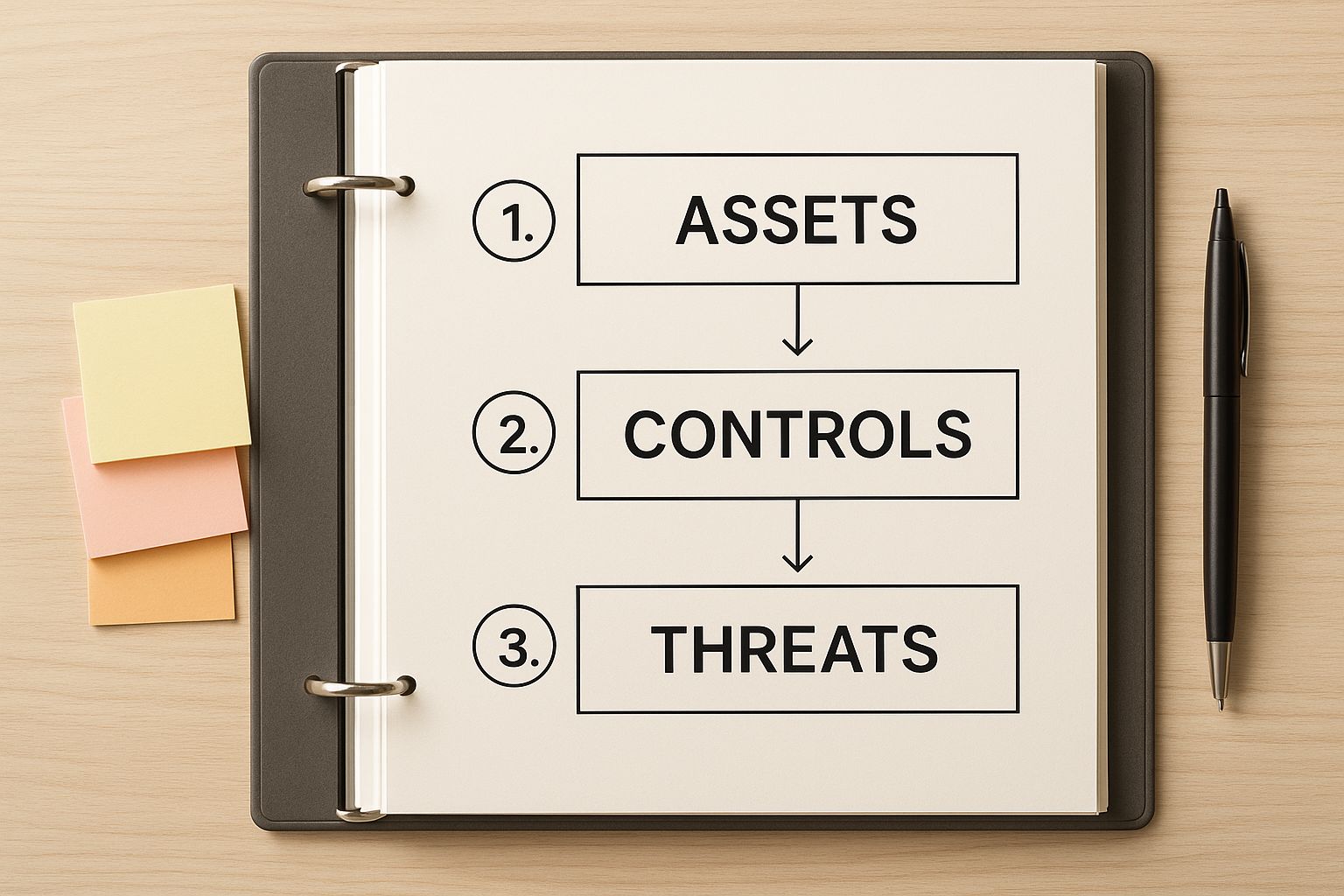
As you can see, the process is logical. You start by identifying what's important (your assets), then figure out what could go wrong (threats), and finally evaluate how you're stopping it (controls). Each step builds on the last.
Taking an Honest Look at Your Current Security Controls
After you've mapped out your assets and the threats they face, it’s time for some honest self-reflection. What security controls do you actually have in place right now for each of those risks?
Let’s take that risk of someone getting unauthorized access to your cloud accounting software. Your current controls might include:
- Multi-Factor Authentication (MFA): Is it truly enforced for every single user, or just for a select few?
- Access Control Policies: Do you operate on a "principle of least privilege" model, where people only have access to what they absolutely need?
- Activity Logging: Are you actively logging login attempts, and would you even be able to spot suspicious activity if it happened?
The goal here isn't just to check a box and say you have a control. You need to assess how effective it really is. A firewall is a great tool, but a misconfigured firewall is about as useful as a screen door on a submarine. Be brutally honest with your evaluation.
By mapping your specific risks to your existing controls right inside the cybersecurity risk assessment template, the gaps in your security posture will become crystal clear. This isn't just an exercise; this document becomes your roadmap. It shows you exactly where to focus your time, money, and effort.
If navigating this process feels overwhelming, getting an expert set of eyes on it can make all the difference. Exploring professional cybersecurity services can provide the deep expertise needed to ensure your assessment is thorough, accurate, and truly effective.
Using Quantitative Data to Justify Security Investments
https://www.youtube.com/embed/PiBgZhEoPYU
If you want to get a security project approved, you have to talk about money. It’s the language of the boardroom. A vague warning about a "high risk" is easy for executives to dismiss, but telling them about a potential $1.2 million loss? That gets their attention, and fast.
This is exactly why a quantitative cybersecurity risk assessment template is so powerful. It translates abstract threats that seem like tech problems into concrete financial figures that are business problems.
You get to shift the entire conversation. Instead of getting lost in the weeds talking about vulnerabilities, you can clearly present potential annual losses, calculate the return on security investment (ROSI), and show exactly how you'll reduce risk. Suddenly, your budget request isn't just another line item from the IT department; it's a strategic move to protect the company's bottom line.
Calculating and Communicating Financial Risk
So, how do you actually put a number on these risks? Frameworks like FAIR (Factor Analysis of Information Risk) give you a solid, structured model to do just that.
Imagine you're a healthcare provider, and you're trying to quantify the real cost of a ransomware attack on your patient data. Using a quantitative approach, you’d start breaking down all the potential financial hits.
- Regulatory Fines: What are the likely HIPAA penalties for a breach of this size?
- Customer Notification: How much will it cost to legally notify every single affected patient?
- Credit Monitoring: What's the price tag for providing credit monitoring services to everyone impacted?
- Operational Downtime: How much revenue do you lose for every hour your clinic or hospital systems are down?
Once you assign dollar values to each of these, your risk assessment template does the talking for you. You can clearly demonstrate that a $100,000 investment in better endpoint protection could realistically prevent a catastrophic $2 million loss. The spending decision becomes a no-brainer. This approach is central to effective data-driven decision-making, turning guesswork into strategy.
Meeting Compliance and Audit Demands
This kind of hard data isn't just for the boardroom—it's also a massive asset when dealing with auditors and regulators. When you can hand them a detailed analysis showing exactly how you've calculated, prioritized, and addressed your risks, it proves you're running a mature and responsible security program. It’s the proof they need to see.
While it's not yet the standard everywhere, this quantitative method is definitely catching on. Right now, about 15% of Fortune 500 companies are using templates that assign numerical scores to their risks. And the numbers back it up: Trend Micro's 2024 data showed that businesses with a high Cyber Risk Index (CRI) suffered 50% more successful cyberattacks. The link between risk scores and real-world breaches is undeniable.
By quantifying risk, you transform security from an ambiguous necessity into a measurable business function. It provides the clarity needed to invest wisely, act decisively, and defend your decisions with confidence.
Ultimately, a quantitative cybersecurity risk assessment template gives you the solid evidence you need to build a compelling business case. This is especially vital for companies trying to get the most out of every dollar, a challenge we discuss in our guide on why San Antonio businesses need managed IT and cybersecurity services. It’s the most effective tool you have for securing the resources to build a truly resilient defense.
Integrating Automation into Your Risk Management
A filled-out cybersecurity risk assessment template is a great starting point, but let's be honest—it’s a snapshot. The moment you finalize it, a new server gets spun up, a new threat emerges, and the whole picture starts to go stale. To keep up with this constant churn, a lot of us are moving away from these static documents and toward a live feed of our risk posture through automation.
This isn’t just about saving time; it's about shifting risk management from a once-a-quarter chore to a continuous, dynamic process. Automated platforms can take a massive chunk of the manual grunt work off your plate, freeing up your security team to actually fix problems instead of just finding them. Think of it as having real-time visibility into what’s happening right now.

The Power of Continuous Monitoring
Instead of manually running vulnerability scans or double-checking software versions, automated tools can handle the heavy lifting. They’re built to constantly scan your network, cloud environments, and endpoints, flagging new weaknesses the moment they appear.
Here’s a real-world scenario: a critical new vulnerability is discovered in the web server software you rely on.
- The Old Way (Manual): You probably wouldn't find out until your next scheduled scan, which could be weeks or even months away. That’s a long time to leave the door wide open.
- The New Way (Automated): A good automated platform would spot the vulnerable software within hours, automatically update your risk register, and fire off an alert to your team to get on it.
This shift is more than just a trend. The latest figures show that 48% of organizations globally are using these kinds of solutions, and that number jumps to 55% in North America. We're seeing platforms like BitSight and Trend Micro’s CREM cutting down manual effort by as much as 60%. Even better, companies using them are reporting a 30% faster fix time for critical vulnerabilities. You can dig into the numbers in the 2025 cyber risk report.
Automation transforms your risk assessment from a historical document into a living, breathing tool that provides actionable intelligence when you need it most.
When you're trying to decide if automation is the right move, it helps to see a direct comparison. Here's a quick breakdown of how manual and automated approaches stack up against each other.
Manual vs Automated Risk Assessments
| Feature | Manual Assessment | Automated Assessment |
|---|---|---|
| Data Collection | Time-consuming interviews, checklists, and manual scans. | Continuous, real-time data feeds from across the IT environment. |
| Frequency | Periodic (quarterly, annually). Creates security "blind spots" between assessments. | Continuous or on-demand. Provides a constantly updated view of risk. |
| Accuracy | Prone to human error, outdated information, and subjective judgments. | Objective, data-driven, and consistent. Reduces the chance of errors. |
| Scope | Often limited to critical assets due to resource constraints. | Can easily scale to cover the entire IT landscape, including cloud and IoT. |
| Remediation | Slow process; findings are documented in a report and assigned manually. | Integrated ticketing and workflows; alerts are sent directly to the right teams. |
While the table makes automation look like a clear winner, it’s not always a simple switch. The right approach often involves a mix of both, using automation to handle the data gathering and continuous monitoring while relying on human expertise for strategic analysis and complex decision-making.
Overcoming Integration Challenges
Of course, dropping a new tool into your existing setup is rarely a simple plug-and-play affair. One of the biggest hurdles is getting these modern platforms to talk to your existing, and sometimes legacy, systems. You've likely got a mix of on-prem servers, different cloud providers, and specialized software that weren't built to communicate seamlessly.
The key to making it work is solid planning. Before you even look at vendors, start by mapping out your most critical assets and identifying where your most important risk data lives. With that map in hand, you can look for an automation tool with a robust API that can hook into your SIEM, ticketing platforms, and other essential systems.
My advice? Don't try to boil the ocean. A phased rollout, maybe starting with a single department or a specific critical system, is the best way to work out the kinks before you go big.
Got Questions About Risk Assessment Templates? We've Got Answers.
When you first dive into a cybersecurity risk assessment template, a few questions are bound to surface. That's perfectly normal. Getting a handle on these details is what separates just filling out a spreadsheet from actually building a stronger security program.
Let's walk through some of the most common questions I hear from teams just starting out.
How Often Should We Really Be Doing This?
One of the first things people ask is about frequency. Is this a one-and-done project or something more?
A full, comprehensive risk assessment should be on your calendar at least once a year. But don't make the mistake of treating it like an annual chore you just have to get through. Your threat landscape is always shifting, and your assessment process needs to keep up.
Think about triggering a fresh assessment anytime something significant changes in your business. This isn't just a best practice; it's essential. For example, you should definitely revisit your assessment when:
- You're rolling out a new cloud service or a major piece of software.
- You’re about to launch a new product that will handle sensitive customer data.
- Your company is going through a merger or acquisition.
For businesses in fast-paced sectors, the gold standard is moving toward a continuous assessment model. This means you're using tools and processes to keep a finger on the pulse of your risk in near real-time. It becomes a living, breathing part of your security strategy, not just a static report that collects dust.
What's the Difference Between a Risk Assessment and a Vulnerability Scan?
This is another classic point of confusion. They sound similar, but they play two very different—and equally important—roles.
I like to use a home security analogy. A vulnerability scan is like walking around your house and making a list of all the unlocked doors and open windows. It’s a technical checklist of weaknesses.
A risk assessment, on the other hand, asks the bigger questions. It tries to figure out the odds of a burglar even being in your neighborhood, what they’d be looking to steal, and whether that cheap lock on your back door is really strong enough to stop them.
A vulnerability scan finds technical flaws. A risk assessment gives you the strategic "so what?"—it evaluates the threats, potential business impact, and your existing defenses to tell you what your real-world risk actually is.
Can a Small Business Really Use a Big Framework Like NIST?
Absolutely. There's a common myth that robust frameworks, like the one from the National Institute of Standards and Technology (NIST), are just for giant corporations with massive security teams. That couldn't be further from the truth.
The trick for a small business is to scale the approach. Don't feel like you need to tackle every single control in the NIST Cybersecurity Framework on day one—that's a recipe for getting overwhelmed.
Instead, use it as your roadmap. Start with the five core functions: Identify, Protect, Detect, Respond, and Recover. From there, pick and choose the specific controls that address your most pressing risks first. This lets you build a rock-solid security foundation without needing a huge budget or a dedicated team of analysts.
At Defend IT Services, we guide businesses of all sizes through these kinds of questions every day, helping them run risk assessments that deliver genuine value. To see how we can help you build a more resilient security program, visit us at https://defenditservices.com.